Remove time from date / timestamp in Excel – 4 easy ways
When working with date-time data in Excel, you may encounter datetime values like "1/24/2024 14:30:00," and you might need to extract only the date "1/24/2024" without the time part. This article will introduce you to four simple methods to remove the time from the timestamp. These methods are simple and easy to understand, suitable for various situations, and whether you are a beginner or an experienced Excel user, you can quickly learn and apply them.

Hide the time from date by changing format
Remove time from date by using a smart feature
Hide the time from date by changing format
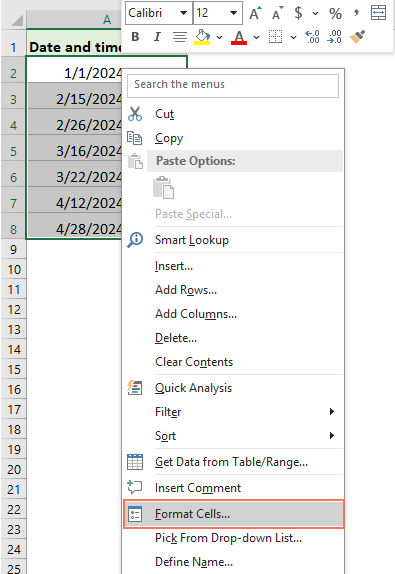
- Select the cells you want to remove time, and right click, in the context menu, choose Format Cells to open the Format Cells dialog box. See screenshot:
Tip: You can also use the shortcut Ctrl +1 to open the Format Cells dialog box.
- In the Format Cells dialog, under the Number tab:
1). Select Date from the Category list;
2). Select one type of date as you need from the Type list box;
3). Finally, click OK button.
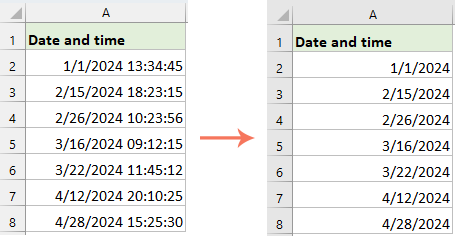
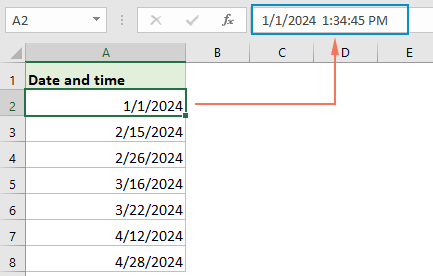
- Now, the selected cells are formatted to display only the date, with the time removed. see screenshot:



Remove time from date by using a smart feature
If you want to remove the time from the time stamp completely, Kutools for Excel offers a smart feature - Remove time from date, with this feature, you can directly remove time from the datetime cell with only several clicks.
After installing Kutools for Excel, please do as this:
- Click to select a cell where you want to place the result, then click Kutools > Formula Helper > Formula Helper.
- In the Formulas Helper dialog, click the Remove time from date in the Choose a formula section.
- Then go to the Argument input section, select a cell that you want to remove time from.
- At last, click OK button.


Result:
Now, the time has been removed from the datetime, then drag fill handle over the cells you want to apply this formula as you need, see the demo below:

Remove time from date by using formulas
In Excel, there are some simple formulas that can be used to eliminate the time from a timestamp, allowing you to extract only the date portion.

Using INT function to extract only date
- Please enter or copy the following formula into a cell where you want to put the result. Then, drag the fill handle down to fill this formula to the rest cells, you will get the date with time part (00:00:00) in the result, see screenshot:
=INT(A2)
- To not show the time part, still keep the results selecting, and then, click Home > General > Short Date. Now, the results are displayed as date only. See screenshot:


Using DATE function to extract only date
To extract only the date part, you can also use the DATE function.
Generic syntax:
datetime: The cell contains the datetime that you want to extract date only from.
Please enter or copy the following formula into a cell where you want to put the result. Then, drag the fill handle down to fill this formula to the rest cells, all the dates have been extracted from the datetime cells without time. See screenshot:
=DATE(YEAR(A2),MONTH(A2),DAY(A2))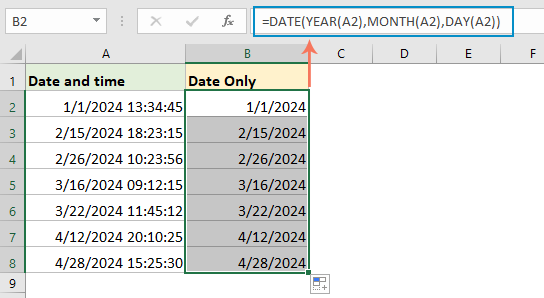
Remove time from date by using Find and Replace function
Follow these steps to remove time from dates using Excel's Find and Replace function:
- Select the date range that you want to remove the time.
- Press Ctrl + H or navigate to Home > Find & Select > Replace to open the Find and Replace dialog box.
- In the Find and Replace dialog box:
1). Enter a spacebar and an asterisk * into the Find what box;
2). Leave blank in the Replace with box;
3). Finally, click Replace All button.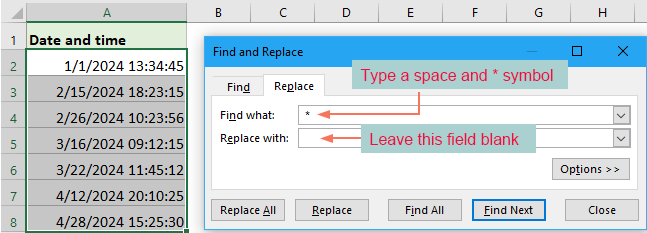
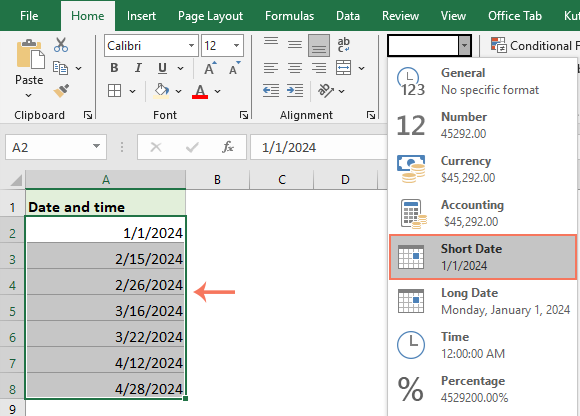
- Now, all of the time have been removed from the date range, the date may still display with a time portion of 00:00:00. See screenshot:

- Then you can format the range to show only the date by clicking Home > General > Short Date. See screenshot:



Related Articles:
- Remove date from date time in Excel
- If you have a list of date and time stamps in your worksheet, and now you want to remove the date from the date time and only leave the time. Do you have any quick methods to deal with this job?
- Combine text and date into same cell in Excel
- Supposing you have two columns which one contains text strings and another is filled with date, now, you want to combine these two columns to get the following screenshot result. Most of us may concatenate the two columns directly, but the date will be displayed as integer number. This article, I will introduce some effective methods to correctly combine text and date into one cell in Excel.
- Extract date from text strings in Excel
- In Excel worksheet, how could you extract the date from text strings as following screenshot shown? This article, I will talk about a useful formula to solve it.
- Extract month and year only from date in Excel
- If you have a list of date format, now, you want to extract only the month and year from date as left screenshot shown, how could you extract month and year from the date quickly and easily in Excel?
Best Office Productivity Tools
Supercharge Your Excel Skills with Kutools for Excel, and Experience Efficiency Like Never Before. Kutools for Excel Offers Over 300 Advanced Features to Boost Productivity and Save Time. Click Here to Get The Feature You Need The Most...

Office Tab Brings Tabbed interface to Office, and Make Your Work Much Easier
- Enable tabbed editing and reading in Word, Excel, PowerPoint, Publisher, Access, Visio and Project.
- Open and create multiple documents in new tabs of the same window, rather than in new windows.
- Increases your productivity by 50%, and reduces hundreds of mouse clicks for you every day!

