How to Enable Word Tabbed Documents in Microsoft 2003, 2007 and 2010
When someone tells me that working with Microsoft Word can be as easily as browsing the webpages in a tabbed window, I think it is ridiculous and weird. All we have known and wondered is that Microsoft Office does not integrate the tabbed window function even though it will be much more convenient for Word users.
Recommended Productivity Tools for Word
Kutools for Word: Integrating AI 🤖, over 100 advanced features save 50% of your document handling time.Free Download
Office Tab: Introduces the browser-like tabs to Word (and other Office tools), simplifying multi-document navigation.Free Download
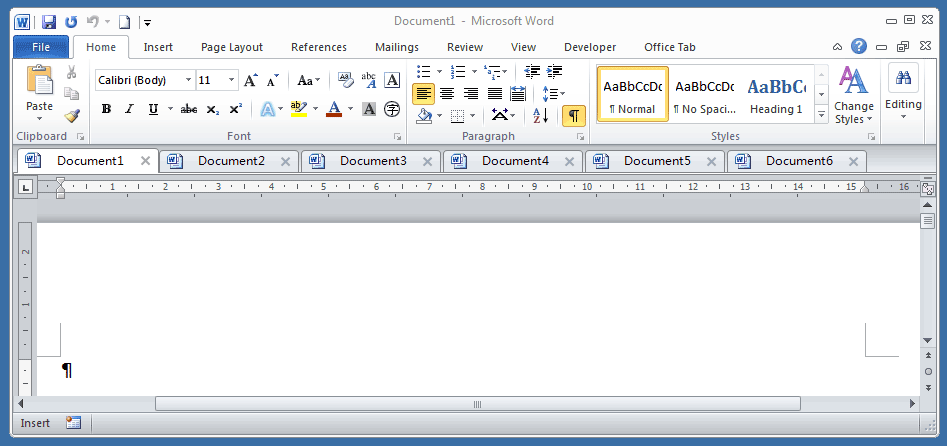
Now the idea of word tabbed documents is realized with Office Tab, which is steadily developed for Office users for years. As the Figure 1 shows, after installing the add-in, I open 4 documents at the same time, and all of them are listed neatly in the tab bar. Users can view the word tabbed documents in a single tabbed window. If the documents are modified, it will stick an asterisk after the documents’ names to indicate the change.
Office Tab: Brings tabbed interfaces to Word, Excel, PowerPoint... |
|
Enhance your workflow now. Read More Free Download
|

Figure 1
This kind of word tabbed document interface has been accepted and widely used by various users. When getting used to the word tabbed interface, you may find the taskbar crowded if there is no Office Tab installed, especially when there are more than 5 tasks operating. If you need to open more than ten documents, how can you do if there is no tabbed window interface? In short, if you are always opening several documents at a time, Office Tab must be of great help.
Use Tabbed Document Interface in Office 2003/2007/2010/2013/2016/2019:
 Using tabs in Word, Excel, PowerPoint, Publisher, Access, Project and Visio;
Easy to switch back and forth between files in Microsoft Office 2003/2007/2010/2013/2016/2019;
Compatible with Windows XP, Windows Vista, Windows 7 / 8 / 10, Windows Server 2003 and 2008, Citrix System and Windows Terminal (Remote Desktop) Server;
Free trial without feature limitation in 30 days!