How to save all documents in Word?
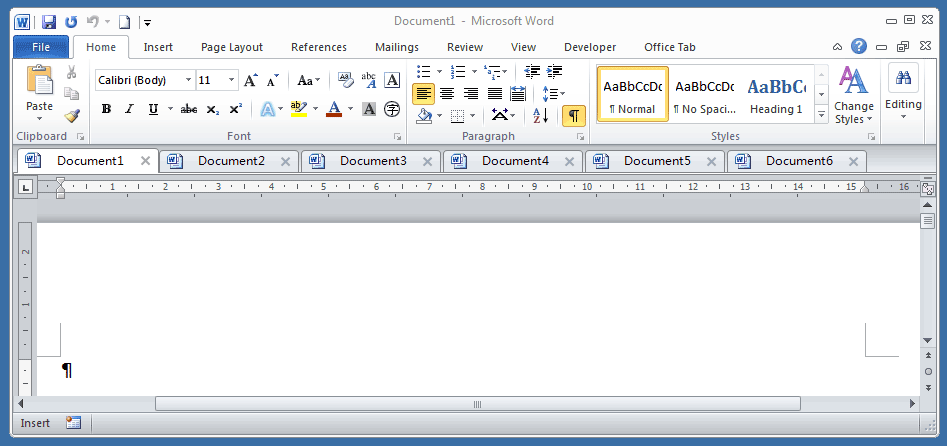
Using Office Tab, which brings you a tabbed document interface in Word, Excel, PowerPoint and more. You can save all documents by right click on a document tab and choose Save All command item.
Recommended Productivity Tools for Word
Kutools for Word: Integrating AI 🤖, over 100 advanced features save 50% of your document handling time.Free Download
Office Tab: Introduces the browser-like tabs to Word (and other Office tools), simplifying multi-document navigation.Free Download

If you want to save all documents in Word 2007/2010/2013 without using Office Tab, you need to enable the Save All button first.
 To enable the Save all button in Word 2007/2010/2013:
 To enable the Save all button in Word 2007/2010/2013:
Office Tab: Brings tabbed interfaces to Word, Excel, PowerPoint... |
|
Enhance your workflow now. Read More Free Download
|
1. In word 2007, click Office button  , and click Word Options; in word 2010/2013, Click File tab
  , and click Options
 |
 |
|
| In Word 2007 | In Word 2010/2013 |
2. In Word 2007, click Customize and select Commands not in the Ribbon in Choose commands from drop down box. Scroll down in the left window and select Save All. Click the Add button, and click OK.
Kutools for Word, a handy add-in, includes groups of tools to ease your work and enhance your ability of processing word document. Free Trial for 45 days! Get It Now!
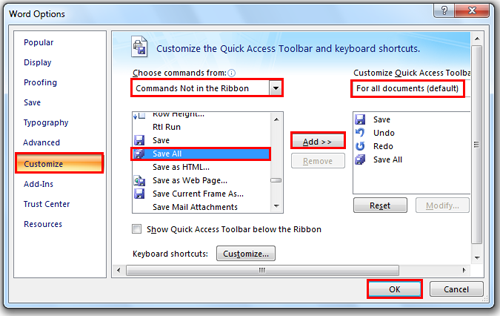
3. In Word 2010/2013, click Customize Ribbon and select Commands not in the Ribbon in Choose commands from drop down box. Scroll down in the left window and select Save All. Click New Tab to add a new tab to the ribbon. Click the Add button, and click OK.

4. You will see the Save All button as show in following screenshots:

In Word 2007

In Word 2010/2013
Note: In Word 2010/2013, right click on Save All button, you can add this button to quick access toolbar too.
 |
 |
 |
Use Tabbed Document Interface in Office 2003/2007/2010/2013/2016/2019:
 Using tabs in Word, Excel, PowerPoint, Publisher, Access, Project and Visio;
Easy to switch back and forth between files in Microsoft Office 2003/2007/2010/2013/2016/2019;
Compatible with Windows XP, Windows Vista, Windows 7 / 8 / 10, Windows Server 2003 and 2008, Citrix System and Windows Terminal (Remote Desktop) Server;
Free trial without feature limitation in 30 days!