How to Convert Country Names to ISO Codes in Excel
Need to convert country names to ISO codes in Excel? Country data often needs to be standardized for customer lists, shipping records, international reports, system imports, or other datasets. For example, a worksheet may contain full country names such as Canada, Germany, or Japan, while another system requires standard country codes such as CA, DE, or JP.
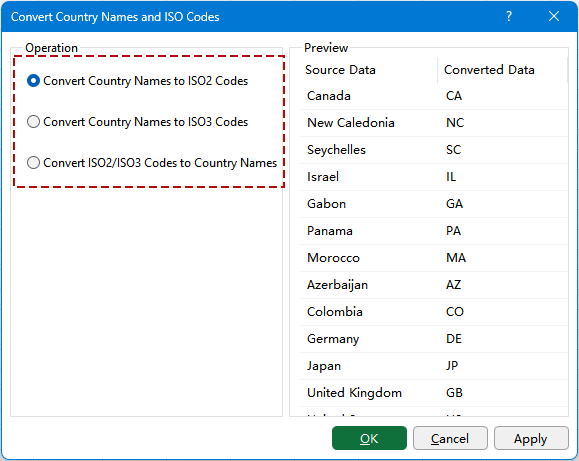
Convert Country/Region Names and ISO Codes in Kutools for Excel lets you convert selected cells between country names and ISO country codes without formulas or a separate lookup table. You can convert country names to ISO2 or ISO3 codes, or convert ISO2/ISO3 codes back to full country names. A built-in preview also lets you review the converted results before applying them to your worksheet.
Advantages of the Convert Country/Region Names and ISO Codes function
How to use Convert Country/Region Names and ISO Codes
- Convert country names to ISO2 codes
- Convert country names to ISO3 codes
- Convert ISO2/ISO3 codes to country names
Advantages of the Convert Country/Region Names and ISO Codes function
The Convert Country/Region Names and ISO Codes function provides a quick way to standardize country data in Excel, whether you need short country codes for another system or full country names for easier reading.
Convert without formulas or lookup tables
Convert country data directly without building a separate country-code table or using VLOOKUP, XLOOKUP, or other lookup formulas.
Support both ISO2 and ISO3 codes
Convert country names to two-letter codes such as CA and DE, or three-letter codes such as CAN and DEU, depending on the format you need.
Convert codes back to country names
Turn ISO2 or ISO3 codes back into full country names when you need more readable data for reports, review, or further editing.
Convert multiple cells at once
Select a list of country names or ISO codes and convert the entire selected range in one operation instead of looking up and replacing values individually.
Preview results before applying
The Preview area displays the Source Data alongside the Converted Data, making it easy to check the results before updating your worksheet.
How to use Convert Country/Region Names and ISO Codes
The Convert Country/Region Names and ISO Codes function supports three common conversion needs: turning country names into ISO2 codes, turning country names into ISO3 codes, and converting ISO2 or ISO3 codes back to full country names. Choose the option that matches the format you need and follow the corresponding steps below.
Convert country names to ISO2 codes
Use this option when you need two-letter country codes, such as CA for Canada, DE for Germany, or JP for Japan.
1. Select the cells containing the country names you want to convert.
2. On the Kutools tab, click Content > Convert Country/Region Names and ISO Codes.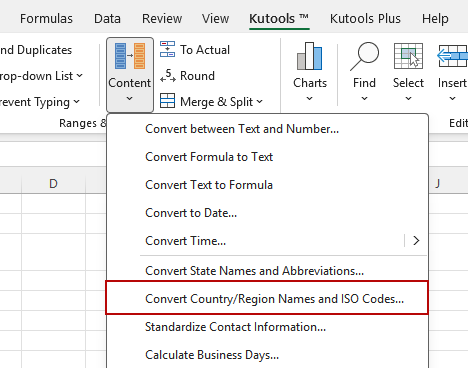
3. In the dialog box, select Convert Country Names to ISO2 Codes. The Preview area shows each country name and its corresponding two-letter code.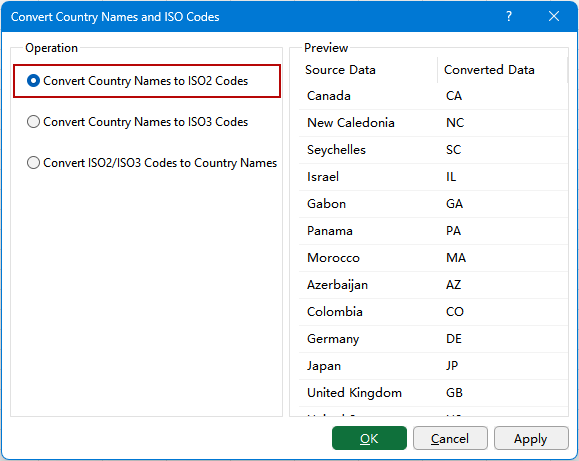
Tip: Review the Source Data and Converted Data in the preview before applying the conversion. For example, Canada is converted to CA, Germany to DE, and Japan to JP.
4. Click Apply or OK to convert the selected country names to ISO2 codes.
Result: The selected country names are replaced with their corresponding two-letter ISO2 codes.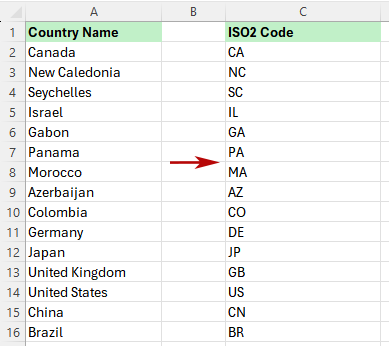
Convert country names to ISO3 codes
Use this option when you need three-letter country codes, such as CAN for Canada, DEU for Germany, or JPN for Japan.
1. Select the cells containing the country names you want to convert.
2. On the Kutools tab, click Content > Convert Country/Region Names and ISO Codes.
3. In the dialog box, select Convert Country Names to ISO3 Codes. The Preview area shows each country name and its corresponding three-letter code.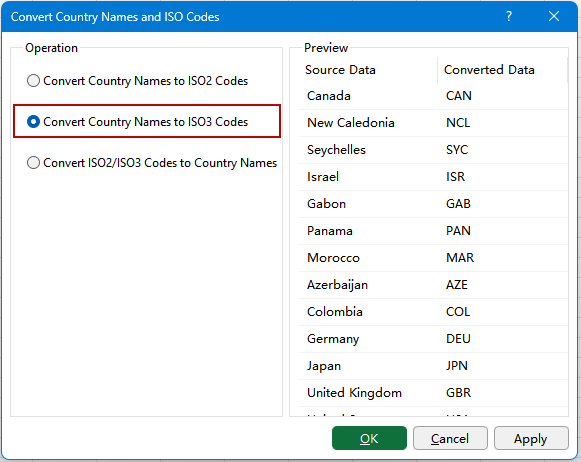
Tip: Check the Source Data and Converted Data in the preview before applying the conversion. For example, Canada is converted to CAN, Germany to DEU, and Japan to JPN.
4. Click Apply or OK to convert the selected country names to ISO3 codes.
Result: The selected country names are replaced with their corresponding three-letter ISO3 codes.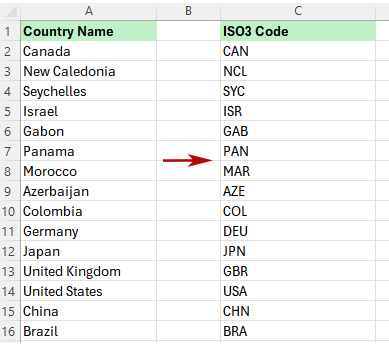
Convert ISO2/ISO3 codes to country names
Use this option when your cells contain ISO2 or ISO3 codes and you want to convert them back to full country or region names for easier reading, reporting, or checking.
1. Select the cells containing the ISO2 or ISO3 codes you want to convert.
2. On the Kutools tab, click Content > Convert Country/Region Names and ISO Codes.
3. In the dialog box, select Convert ISO2/ISO3 Codes to Country Names. The Preview area shows each recognized code and its corresponding full country or region name.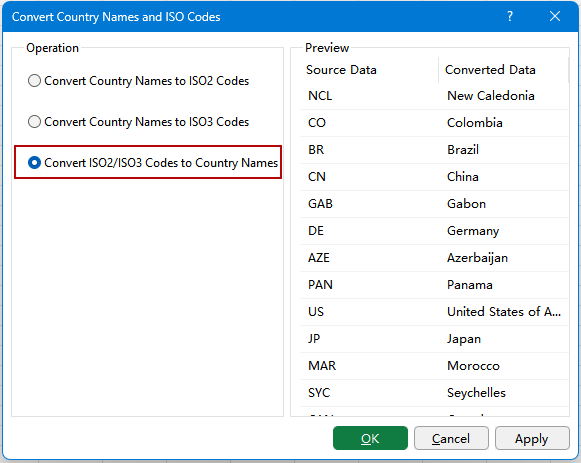
Tip: This option supports both ISO2 and ISO3 formats. For example, CA and CAN are both converted to Canada, while JP and JPN are both converted to Japan.
4. Click Apply or OK to convert the selected codes to country or region names.
Result: The selected ISO2 or ISO3 codes are replaced with their corresponding full country or region names.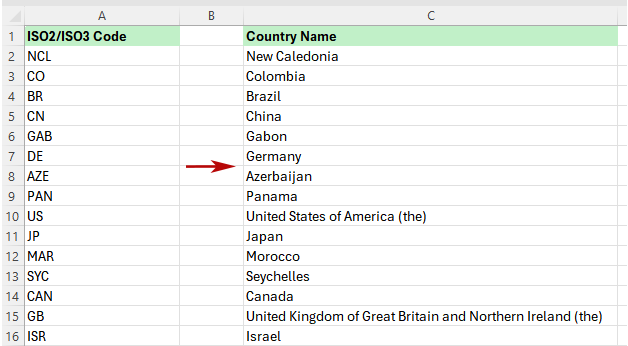
Notes for country name and ISO code conversion
Keep the following points in mind when converting country names and ISO codes in Excel.
- ISO2 codes use two letters: Examples include CA for Canada, DE for Germany, JP for Japan, and GB for the United Kingdom.
- ISO3 codes use three letters: The corresponding ISO3 examples are CAN, DEU, JPN, and GBR.
- Choose the format required by your destination: Some databases, websites, shipping systems, and other applications require ISO2 codes, while others use ISO3. Check the required format before converting your data.
- Use recognizable country names: Country names should be entered in a recognizable form. Misspellings, unusual abbreviations, extra text, or unsupported names may prevent a value from being converted correctly.
- ISO2 and ISO3 codes can both be converted back: When converting codes to country names, use Convert ISO2/ISO3 Codes to Country Names for either two-letter or three-letter codes.
- Review the preview first: Check the Source Data and Converted Data columns before applying the conversion, especially when working with a long list of countries.
- Keep a copy of important source data: Because the conversion updates the selected cells, consider keeping a copy of the original values when working with important datasets.
FAQ
How do I convert country names to ISO codes in Excel?
Select the cells containing country names, open Convert Country Names and ISO Codes in Kutools for Excel, and choose either Convert Country Names to ISO2 Codes or Convert Country Names to ISO3 Codes. Review the preview and apply the conversion.
What is the difference between ISO2 and ISO3 country codes?
ISO2 uses two-letter country codes, such as CA, DE, and JP. ISO3 uses three-letter codes, such as CAN, DEU, and JPN.
Can I convert ISO country codes back to country names?
Yes. Select the cells containing the codes and choose Convert ISO2/ISO3 Codes to Country Names to convert recognized two-letter or three-letter codes back to full country names.
Can I convert multiple country names at once?
Yes. Select the entire range containing the country names and apply the conversion to process multiple cells at once.
Do I need a country code lookup table?
No. The conversion is handled directly by Kutools for Excel, so you do not need to prepare a separate mapping table or use lookup formulas such as VLOOKUP or XLOOKUP.
Should I use ISO2 or ISO3 country codes?
Use the format required by the system or dataset you are working with. ISO2 is commonly used when a two-letter code is required, while ISO3 provides a three-letter representation of the same country.
Why is a country name or ISO code not converted?
The value may contain a spelling error, extra spaces, additional text, an unsupported abbreviation, or an unrecognized country name or code. Check the source value and try the conversion again.
Can ISO2 and ISO3 codes be mixed in the same selected range?
When using Convert ISO2/ISO3 Codes to Country Names, both ISO2 and ISO3 codes can be converted to their corresponding country names, making it useful for lists that contain different code formats.
Productivity Tools Recommended
Office Tab: Use handy tabs in Microsoft Office, just like Chrome, Firefox, and the new Edge browser. Easily switch between documents with tabs — no more cluttered windows. Know more...
Kutools for Outlook: Kutools for Outlook offers 100+ powerful features for Microsoft Outlook 2010–2024 (and later versions), as well as Microsoft 365, helping you simplify email management and boost productivity. Know more...
Kutools for Excel
Kutools for Excel offers 300+ advanced features to streamline your work in Excel 2010 – 2024 and Microsoft 365. The feature above is just one of many time-saving tools included.

Table of Contents
- Advantages of the Convert Country/Region Names and ISO Codes function
- How to use Convert Country/Region Names and ISO Codes
- Convert country names to ISO2 codes
- Convert country names to ISO3 codes
- Convert ISO2/ISO3 codes to country names
- Notes for country name and ISO code conversion
- FAQ
- The Best Office Productivity Tools
Kutools for Excel
Brings 300+ advanced features to Excel
- 🧩 Overview
- 📥 Free Download
- 🎁 30-Day Free Trial available