How to Find Number Combinations That Sum to a Target in Excel
Can Excel find number combinations that sum to a target value?
Not with a built-in feature. Excel can calculate totals and perform many mathematical operations, but it cannot automatically find all combinations of numbers that equal a specified target. Although this can be achieved with VBA or custom algorithms, these methods are often too complex for everyday users.
Fortunately, Make Up a Number in ZKutools Anywhere for Excel lets you solve this problem quickly by automatically finding matching combinations with just a few clicks.
Benefits of Make Up a Number
How to Use Make Up a Number
The following example shows how to use Make Up a Number to find combinations that match a target value.
Step 1. Open the Make Up a Number Tool
Click ZKUTOOLS > Make Up A Number.

The Make Up a Number task pane will appear on the right side of the worksheet.

Step 2. Configure the Search Settings
In the Make Up a Number task pane:
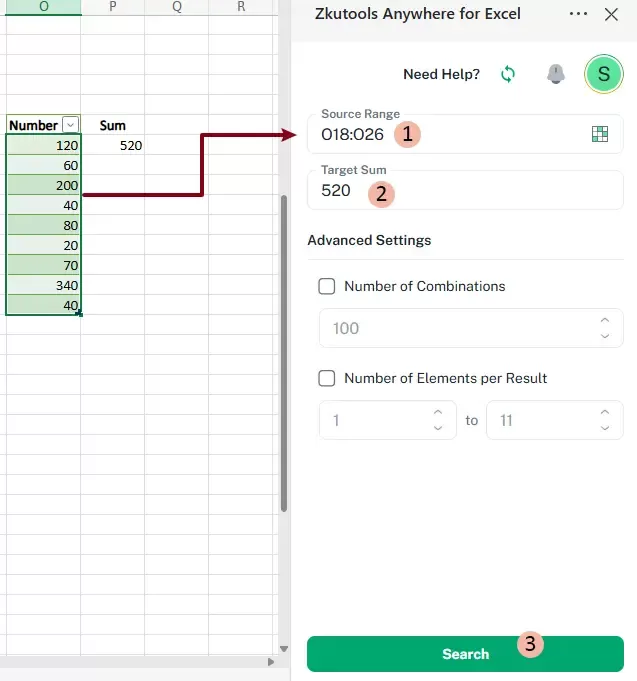
- Select the Source Range containing the numbers you want to search.
- Enter the desired value in the Target Sum box.
- Click Search.
Step 3. Review and Insert the Matching Combinations
Once the search is complete, all matching combinations appear in the results panel. Each result lists the values that add up to the specified target.
Select the cell where you want to insert the result, then click Insert.

Result
As you can see in the screenshot below, the original values, the target sum, and all matching number combinations are inserted into the worksheet starting from the selected cell.

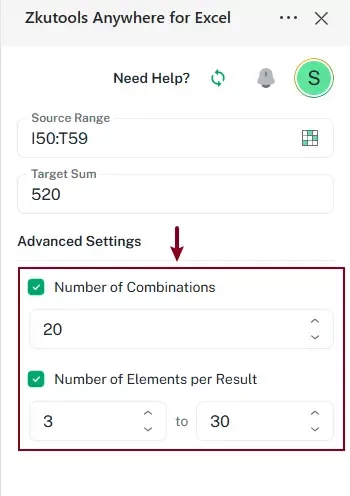
To further refine the search, configure the options under Advanced Settings.
You can configure:
- Number of Combinations — Specify the maximum number of matching combinations to return.
- Number of Elements per Result — Specify the minimum and maximum number of values allowed in each matching combination.
Conclusion
Make Up a Number makes it easy to find number combinations that match a specified target value. By eliminating manual calculations and complicated formulas, it helps you save time and improve accuracy.
Whether you're working with financial records, expense reports, inventory lists, or other datasets, Make Up a Number provides a fast and flexible solution for identifying matching combinations directly in Excel.