How to quickly swap contents of two cells in Excel?
When we are handling a worksheet, we may need to swap the contents of two cells sometimes. Normally most of us just know “to cut, paste and copy” for swapping the contents, but it’s time-consuming. We are going to talk about how to quickly swap contents in cells in Excel.
Manually swap two adjoining cell contents
Swap two nonadjacent cell contents with VBA code
Easily swap two random cell contents with only several clicks
Manually swap two adjoining cell contents
Sometimes, there are two adjoining cells need to be swapped. We can manually do it easily. Look at the following screenshot, I want to swap cell A4 and B4, please do as follows:

1. Select the cell you want to swap. In this example, select cell A4.
2. Press Shift key, and put the cursor at the right border.
3. Then drag the cursor to the right border of cell B4.
4. When there displays “工”, release the mouse.
5. And the two cell contents have been swapped. See screenshot:

With this method, we can also swap two adjoining rows or columns.
Quickly swap contents of two cells or ranges in Excel:
Kutools for Excel's Swap Ranges utility helps you easily swap two specified cells or ranges at once in Excel as the below demo shown.
Download and try it now! (30-day free trail)

Swap two nonadjacent cell contents with VBA code
When the two cells are nonadjacent, the above method will not work. We can swap them with VBA code.
1. Press the Ctrl key and select the two nonadjacent cells you want to swap.
2. Click Developer>Visual Basic, a new Microsoft Visual Basic for applications window will be displayed, click Insert>Module, and input the following code into the Module:
Sub SwapTwoRange()
'Updateby20131120
Dim Rng1 As Range, Rng2 As Range
Dim arr1 As Variant, arr2 As Variant
xTitleId = "KutoolsforExcel"
Set Rng1 = Application.Selection
Set Rng1 = Application.InputBox("Range1:", xTitleId, Rng1.Address, Type:=8)
Set Rng2 = Application.InputBox("Range2:", xTitleId, Type:=8)
Application.ScreenUpdating = False
arr1 = Rng1.Value
arr2 = Rng2.Value
Rng1.Value = arr2
Rng2.Value = arr1
Application.ScreenUpdating = True
End Sub3. Then click  button to run the code, then a dialog is displayed for you to select the two cells you want to swap between. See screenshots:

4. Click Ok in the popped-up dialog, the two selected cells are swapped. See screenshots:

Notes: This VBA code can’t swap the formatting of the two cells.
Easily swap two random cell contents with only several clicks
With Kutools for Excel's Swap Ranges utility, we not only can swap two adjoining cells, rows or columns, but also can switch two nonadjacent cells, rows or columns easily.
Before applying Kutools for Excel, please download and install it firstly.
1. Click Kutools > Range > Swap Ranges, see screenshot:

2. In the Swap Ranges dialog box, you need to:
- (1) click the first
 button in the Swap Range 1 box to select the cells that you like to swap.
 - (2) click the second button from Swap Range 2 box to select the cells you will swap with.
Tips: You can select the two ranges before applying the feature, then you can see the selected two ranges are displayed in the Swap Range 1 and Swap Range 2 boxes separately. - (3) Click the OK button.
 button in the Swap Range 1 box to select the cells that you like to swap.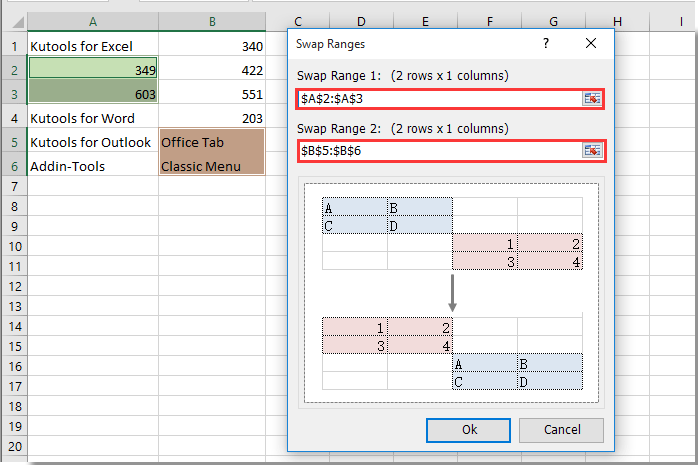
Then two selected cells or ranges are swapped immediately. See screenshots:

If you want to have a free trial (30-day) of this utility, please click to download it, and then go to apply the operation according above steps.
Demo: Swap two random cell contents with Kutools for Excel
Related article:
Best Office Productivity Tools
Supercharge Your Excel Skills with Kutools for Excel, and Experience Efficiency Like Never Before. Kutools for Excel Offers Over 300 Advanced Features to Boost Productivity and Save Time. Click Here to Get The Feature You Need The Most...

Office Tab Brings Tabbed interface to Office, and Make Your Work Much Easier
- Enable tabbed editing and reading in Word, Excel, PowerPoint, Publisher, Access, Visio and Project.
- Open and create multiple documents in new tabs of the same window, rather than in new windows.
- Increases your productivity by 50%, and reduces hundreds of mouse clicks for you every day!

