Quickly insert or add right-aligned caption to equation in Word
Kutools for Word
It's not easy to insert or add a right-aligned caption to an equation in Word, but with Kutools for Word's Insert Equation Caption utility, you can quickly insert a right-aligned caption to an equation in document. Not only quickly insert a caption for an equation, but also you can easily change the equation caption format or style in Word.
Insert or add right-aligned caption to equation
Recommended Productivity Tools for Word
Kutools for Word: Integrating AI 🤖, over 100 advanced features save 50% of your document handling time.Free Download
Office Tab: Introduces the browser-like tabs to Word (and other Office tools), simplifying multi-document navigation.Free Download
Click Kutools Plus > Insert > Equation Caption. See screenshot:
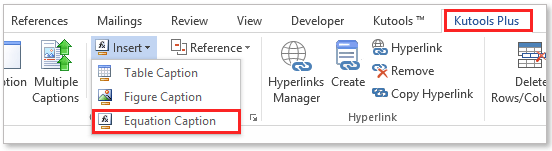

Insert or add right-aligned caption to equation
If you want to insert or add a right -aligned caption to an equation, you can quickly get it done as follows:
1. Please change the equation format or style by bringing up the Advanced Caption Options according to below screenshots.
 |
 |
 |
2. Please specify the Vertical position to Middle and then clicking OK button save setting.
3. You can quickly insert a right-aligned caption for the specified equation in document by clicking Kutools Plus > Insert > Equation Caption. You will see the results as shown in the below screenshot.

Best Office Productivity Tools
Kutools for Word - Elevate Your Word Experience with Over 100 Remarkable Features!
🤖 Kutools AI Assistant: Transform your writing with AI - Generate Content / Polish Text for Clarity / Summarize Documents / Inquire for Information based on Document, all within Word
📘 Document Mastery: Split Pages / Merge Documents / Export Selection in Various Formats (PDF/TXT/DOC/HTML...) / Batch Convert to PDF / Export Pages as Images / Print Multiple Files at once...
✏ Contents Editing: Batch Find and Replace across Multiple Files / Resize All Pictures / Transpose Table Rows and Columns / Convert Table to Text...
🧹 Effortless Clean: Sweap away Extra Spaces / Section Breaks / All Headers / Text Boxes / Hyperlinks / For more removing tools, head to our Remove Group...
➕ Creative Inserts: Insert Thousand Separators / Check Boxes / Radio Buttons / QR Code / Barcode / Diagonal Line Table / Equation Caption / Image Caption / Table Caption / Multiple Pictures / Discover more in the Insert Group...
🔍 Precision Selections: Pinpoint specific pages / tables / shapes / heading paragraphs / Enhance navigation with more Select features...
⭐ Star Enhancements: Navigate swiftly to any location / auto-insert repetitive text / seamlessly toggle between document windows / 11 Conversion Tools...

