How to replace formulas with results or value in Excel?
Supposing you need to replace formulas with their calculated values in cells, of course you can replace them one by one manually. However, it will waste a lot of time if you are going to replace many ones. Are there easy ways? Yes, the following tricky ways will help you easily replace formulas with their calculated values in selections quickly:
For example, I have a range of formulas, and now I need to replace the formulas with the cell values, as following screenshot shows:
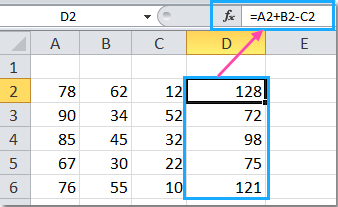

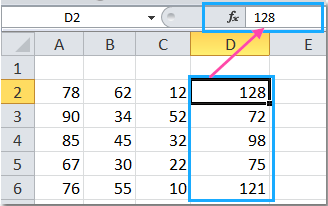

 Replace formulas with results or values with Paste Special command

The Microsoft Excel's Paste Special command can help you remove all formulas but remain calculated values in cells.
Step1: Select the range that you will work with.
Step2: Press the Ctrl + C keys to copy the selected cells.
Step3: Right click the selected cells, and click the Paste Values button under Paste Options.
Now you have all formulas in the selection replaced with their calculated values at one time.
Replace formulas with results or values with VBA
For experienced users of Microsoft Excel, VBA macro is another good choice to replace formulas with calculated values quickly.
Step1: Hold down the Alt + F11 keys in Excel, and it opens the Microsoft Visual Basic for Applications window.
Step2: Click Insert > Module, and paste the following macro in the Module Window.
VBA for replacing formulas with calculated values:
Sub DisplayedToActual()
'Updateby20131126
Dim Rng As Range
Dim WorkRng As Range
On Error Resume Next
xTitleId = "KutoolsforExcel"
Set WorkRng = Application.Selection
Set WorkRng = Application.InputBox("Range", xTitleId, WorkRng.Address, Type:=8)
Application.ScreenUpdating = False
For Each Rng In WorkRng
    Rng.Value = Rng.Text
Next
Application.ScreenUpdating = True
End Sub
Step3: Press the F5 key to run this macro. A dialog is displayed for you to select a range to convert to actual values, see screenshot:
Step4: Click OK. and you can see the result shown as below:
 Replace formulas with results or values with Kutools for Excel

If you have Kutools for Excel, its Displayed To Actual tool can help you quickly convert the value or formula in selected cells to the way they are formatted.
| Kutools for Excel, with more than 300 handy functions, makes your jobs more easier. |
After free installing Kutools for Excel, please do as below:
Step1: Select the range that you will work with.
Step2: Click the Kutools > To Actual, see screenshot:
 |
 |
 |
Then the formulas in the selection are converted to the displayed values.
For more detailed information about this feature, please visit Displayed To Actual.
To Actual--Replace Formula With Displayed Value
Replace formulas with text by Kutools for Excel
If you want to replace formula with text, you can use Kutools for Excel’s Convert Formula to Text utility to convert formulas to texts at once click.
After installing Kutools for Excel, please do as below:(Free Download Kutools for Excel Now!)
Select the formulas and click Kutools > Content > Convert Formula to Text. See screenshot:

Then the formulas are converted to text, and if you want to convert them back to formula, just click Kutools > Content > Convert Text to Formula.
Replace Formula with Text
Best Office Productivity Tools
Supercharge Your Excel Skills with Kutools for Excel, and Experience Efficiency Like Never Before. Kutools for Excel Offers Over 300 Advanced Features to Boost Productivity and Save Time. Click Here to Get The Feature You Need The Most...

Office Tab Brings Tabbed interface to Office, and Make Your Work Much Easier
- Enable tabbed editing and reading in Word, Excel, PowerPoint, Publisher, Access, Visio and Project.
- Open and create multiple documents in new tabs of the same window, rather than in new windows.
- Increases your productivity by 50%, and reduces hundreds of mouse clicks for you every day!

