How to quickly convert between dollars, pounds, euros in Excel?
For example you have a table listing some income and expenses in US dollar, and you want to convert them in Euros or Pounds, or vice verse. Which ways will you apply? There are several easy options for you to solve this problem:
Convert currencies between dollars, pounds, and euros with exchange rates
Convert currencies between dollars, pounds, and euros with Kutools for Excel
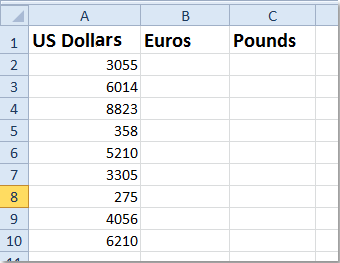
An example may be easy to understand. Supposing you have the following US dollars, now we will guide you to convert the US dollars to Euros and Pounds.
 Convert currencies between dollars, pounds, and euros with exchange rates


The most common way is to find out the exchange rate between two currencies. Take converting dollars to euros for example, you can do it with following steps:
1. Search the exchange rate between US dollar and euros, and the current exchange rate is 1 US Dollar = 0.726089 Euros at present.
2. In Cell B2 enter the formula =A2*0.726089, and press the Enter key.

3. Click the Cell B2, and drag the Fill Handle  to copy this formula to the B3:B10. Then you will get all money in Euros in Column B.

4. You can also convert the US Dollars to UK Pounds, UK Pounds to Euros, UK Pounds to US Dollars, Euros to UK Pounds, and Euros to US Dollars easily with this way.
Convert currencies between dollars, pounds, and euros with Kutools for Excel
Is it boring to search for the exchange rates every time when you need to convert currencies? There are so many currencies, and exchange rates between these currencies changes all the time. It's hard to get the exchange rates. Please do not worry about it, Kutools for Excel's Currency Conversion tool can help you get the latest exchange rates between any kinds of currencies, and help you convert between them quickly.
Kutools for Excel includes more than 300 handy Excel tools. Free to try with no limitation in 30 days. Get it Now.
Step 1: Click Kutools > Content Converter > Currency Conversion. See screenshot:

Step 2: Select the range that you want to convert the currency, and in the Currency Conversion dialog box, specify the settings as following:
- Select the source currency US Dollar from the left list box, and choose the currency EURO that you want to convert from the right list box;
- Click Update rate button to get to the latest exchange rates.

Step 3: Then click Fill options button, in the Fill options prompt box, choose one output type that you want, then close the box to return to the Currency Conversion dialog, see screenshot:

Step 4: After specifying the output type, then click OK or Apply button, you will get the following results:
(1.) If you choose Only cells as output type, all the new converted currency values will replace the original values, see screenshots:
 |
 |
 |
(2.) If you choose Only comment as output type, all of the converted values and some detailed information will be inserted as comments into the original cells. See screenshot:

(3.) If you choose Cells and comment as the output result, the converted values will be filled into the original cells and the detailed information will be inserted as comments as well. See screenshot:

Kutools for Excel's Currency Conversion tools brings you a quick way to convert more than 50 currencies in your Excel by using the latest exchange rates from the reliable Internet web site. You can easily convert a single value or volume values from a range cells with current exchange rates. Click to know more…
Related article:
How to convert currencies in Microsoft Excel?
Best Office Productivity Tools
Supercharge Your Excel Skills with Kutools for Excel, and Experience Efficiency Like Never Before. Kutools for Excel Offers Over 300 Advanced Features to Boost Productivity and Save Time. Click Here to Get The Feature You Need The Most...

Office Tab Brings Tabbed interface to Office, and Make Your Work Much Easier
- Enable tabbed editing and reading in Word, Excel, PowerPoint, Publisher, Access, Visio and Project.
- Open and create multiple documents in new tabs of the same window, rather than in new windows.
- Increases your productivity by 50%, and reduces hundreds of mouse clicks for you every day!

