Quickly delete multiple checkboxes in Excel -4 simple methods
Checkboxes are commonly used in Excel worksheets to create interactive checklists, mark completion, or collect user input. While adding checkboxes can enhance the functionality of your spreadsheets, managing and deleting them—especially in bulk—can quickly become both repetitive and prone to error if not done efficiently. If you need to remove many checkboxes at once, using the right approach will help keep your worksheet tidy, prevent accidental deletion of other items, and save significant time. This tutorial guides you through various practical ways to quickly delete multiple checkboxes in Excel, detailing precautions, applicable scenarios, and step-by-step operation tips to ensure smooth performance regardless of worksheet complexity.
Delete all checkboxes in the worksheet with the Go TO command
Delete multiple checkboxes in a selection or the whole sheet with Kutools for Excel by one click
Delete multiple checkboxes with Select Objects function
Delete multiple checkboxes with VBA code
Delete multiple checkboxes using Excel formula (alternative)
Delete all checkboxes in the worksheet with Go TO command
The Go To Special command in Excel is a convenient way to select and manage various types of objects, including checkboxes. If your worksheet consists only of form controls (like checkboxes), this method enables you to select all of them at once and delete them with a single action, streamlining the process and minimizing manual effort.
This method is simple and widely applicable, but it’s best used when your sheet contains only checkboxes and does not mix other graphical objects that you want to keep—such as shapes, images, or charts—since it will select all objects in the range.
1. On the Home tab, click Find & Select > Go To Special. This opens the Go To Special dialog box. Within the box, choose the Objects option under Select. See screenshot:
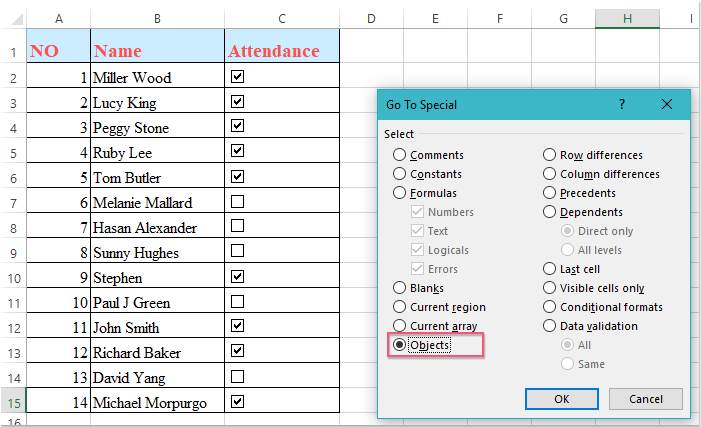
2. Click OK. Excel will immediately highlight all objects on the active worksheet, including checkboxes. Review the selection to ensure only the intended checkboxes are included.

3. On your keyboard, press the Delete key. All selected checkboxes will be removed from your worksheet in an instant.
Delete multiple checkboxes in a selection or whole worksheet with Kutools for Excel by one click
When you want to remove checkboxes specifically from a selected area without risking the deletion of other objects such as buttons or images, Kutools for Excel provides a dedicated Batch Delete Check Boxes feature. This function swiftly removes all checkboxes just in the chosen range, leaving other embedded objects untouched—making it an ideal solution for complex worksheets full of various control objects.
After installing Kutools for Excel, follow these steps for efficient checkbox management:
1. Select the range or worksheet area that contains the checkboxes you want to remove. You can select contiguous cells, an entire sheet, or even non-adjacent ranges by holding the Ctrl key while selecting.
2. Go to the Kutools tab, click Delete, and then choose Batch Delete Check Boxes from the dropdown menu. See screenshot:
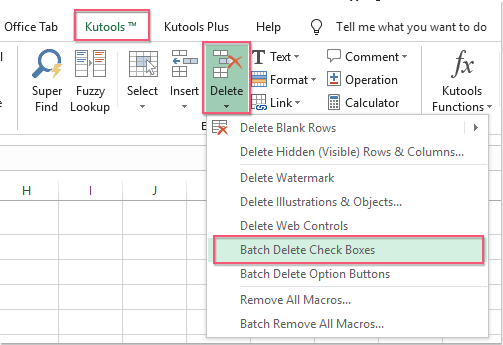
3. Instantly, all checkboxes in the selected area will be deleted without affecting other shapes or controls.
This method is especially beneficial for large worksheets or when checkboxes are mixed with other graphical controls, as it prevents accidental deletion of unrelated objects. If you make a selection that does not contain any checkboxes, Kutools will simply complete the action without changes or error prompts. For further efficiency, double-check the selection range before performing the batch deletion, and always save your workbook prior to significant edits to avoid unintentional loss of data.
Delete multiple checkboxes with Select Objects function
The Select Objects feature in Excel is another practical option for removing checkboxes, particularly if they're grouped within a specific area of your worksheet. This method is suitable when you prefer manual selection and have control over exactly which objects to remove. However, similar to the Go To Special method, if there are multiple objects (such as charts or pictures) in your selected area, these will also be selected and removed unless manually deselected prior to deleting.
1. On the Home tab, click Find & Select > Select Objects. This changes your pointer to a selection arrow, allowing you to manually select objects. See screenshot:
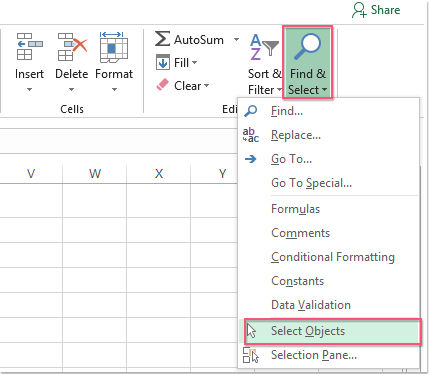
2. Hold down the left mouse button and drag a box around the checkboxes you want to select. This highlights all contained objects. For even more precision, you can hold the Ctrl key and click on individual checkboxes one by one.
3. Once the desired checkboxes are selected, press the Delete key. The selected checkboxes will be removed from your worksheet.
This approach is flexible, but in sheets with numerous objects scattered throughout, it may be less efficient than the batch methods above. It is best used when you want to remove checkboxes from a specific section while controlling precisely what gets deleted.
Delete multiple checkboxes with VBA code
For users familiar with macros, applying a short VBA script offers a powerful way to delete all checkboxes on a worksheet in one go, especially when dealing with hundreds or thousands of form controls. This method is suitable for automating repetitive tasks and ensures that all checkboxes—regardless of their positions—are cleared efficiently. Consider using this if you perform this operation regularly or want more control over bulk deletions.
Be cautious, as this code will remove all checkbox controls (Form Controls) on the currently active worksheet. Always save your workbook before running any VBA code to avoid accidental loss, and ensure you understand the impact if your worksheet contains important objects.
1. Open the VBA editor by clicking Developer > Visual Basic. In the window that appears, click Insert > Module to create a new module, and then paste the code below into the module window:
VBA code: Remove all checkboxes in current worksheet
Sub RemoveCheckboxes()
On Error Resume Next
ActiveSheet.CheckBoxes.Delete
Selection.FormatConditions.Delete
End Sub
2. To run the code, click the  (Run) button within the VBA window. All checkboxes in the active worksheet will be deleted immediately.
Some practical tips: If there are other types of controls (such as option buttons or ActiveX controls), you may need to adjust your code accordingly. If you have multiple worksheets, run the code separately on each sheet, or modify the script to loop through multiple sheets if required.
This article provides step-by-step instructions on deleting multiple checkboxes in Excel through different methods, choose the method that suits you best. If you're interested in exploring more Excel tips and tricks, visit our website for thousands of tutorials designed to enhance your Excel skills.
Related Article:
How to quickly insert multiple checkboxes in Excel?
Best Office Productivity Tools
Supercharge Your Excel Skills with Kutools for Excel, and Experience Efficiency Like Never Before. Kutools for Excel Offers Over 300 Advanced Features to Boost Productivity and Save Time. Click Here to Get The Feature You Need The Most...
Office Tab Brings Tabbed interface to Office, and Make Your Work Much Easier
- Enable tabbed editing and reading in Word, Excel, PowerPoint, Publisher, Access, Visio and Project.
- Open and create multiple documents in new tabs of the same window, rather than in new windows.
- Increases your productivity by 50%, and reduces hundreds of mouse clicks for you every day!
All Kutools add-ins. One installer
Kutools for Office suite bundles add-ins for Excel, Word, Outlook & PowerPoint plus Office Tab Pro, which is ideal for teams working across Office apps.





- All-in-one suite — Excel, Word, Outlook & PowerPoint add-ins + Office Tab Pro
- One installer, one license — set up in minutes (MSI-ready)
- Works better together — streamlined productivity across Office apps
- 30-day full-featured trial — no registration, no credit card
- Best value — save vs buying individual add-in