Compose Emails with AI in New Outlook & Web Outlook (500 Free Uses)
Want clean, on-tone emails in seconds—right inside Outlook? Kutools for Outlook Online (AI) helps you compose without leaving the editor. It works in New Outlook for Windows and Outlook on the web, and you get 500 free uses to start.
Compose a new email with AI (step-by-step)
- Click New mail.
- In the compose window, under the Message tab, click the Apps button > Kutools for Outlook on the toolbar to open the side panel.
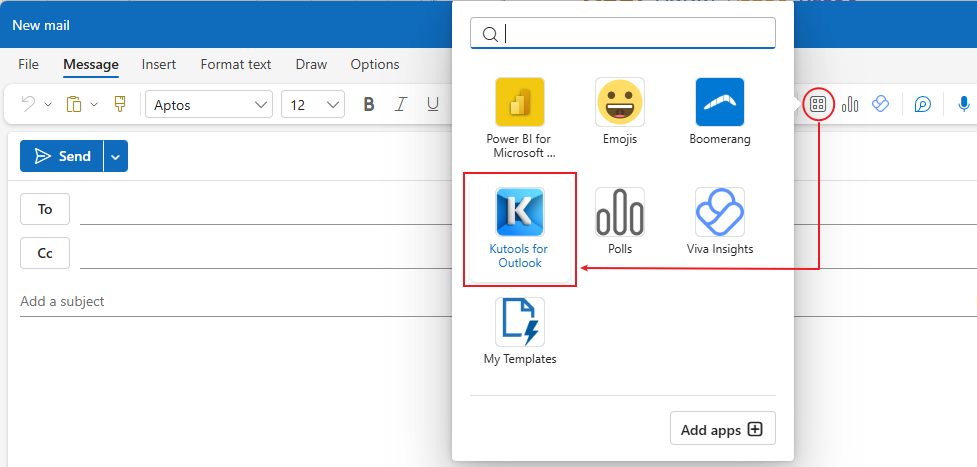
- Choose Compose.
- Describe your intent (bullet points are fine). Example:
- “Follow-up with Jane about Q2 pricing”
- “Confirm Thursday 2 PM meeting; attach agenda link; friendly but professional”
- Pick Tone (Formal/Friendly/Neutral) and Language.
- Click Generate. Review the draft in the panel.
- Click Insert to place it into the email body (or Replace if you already have text).
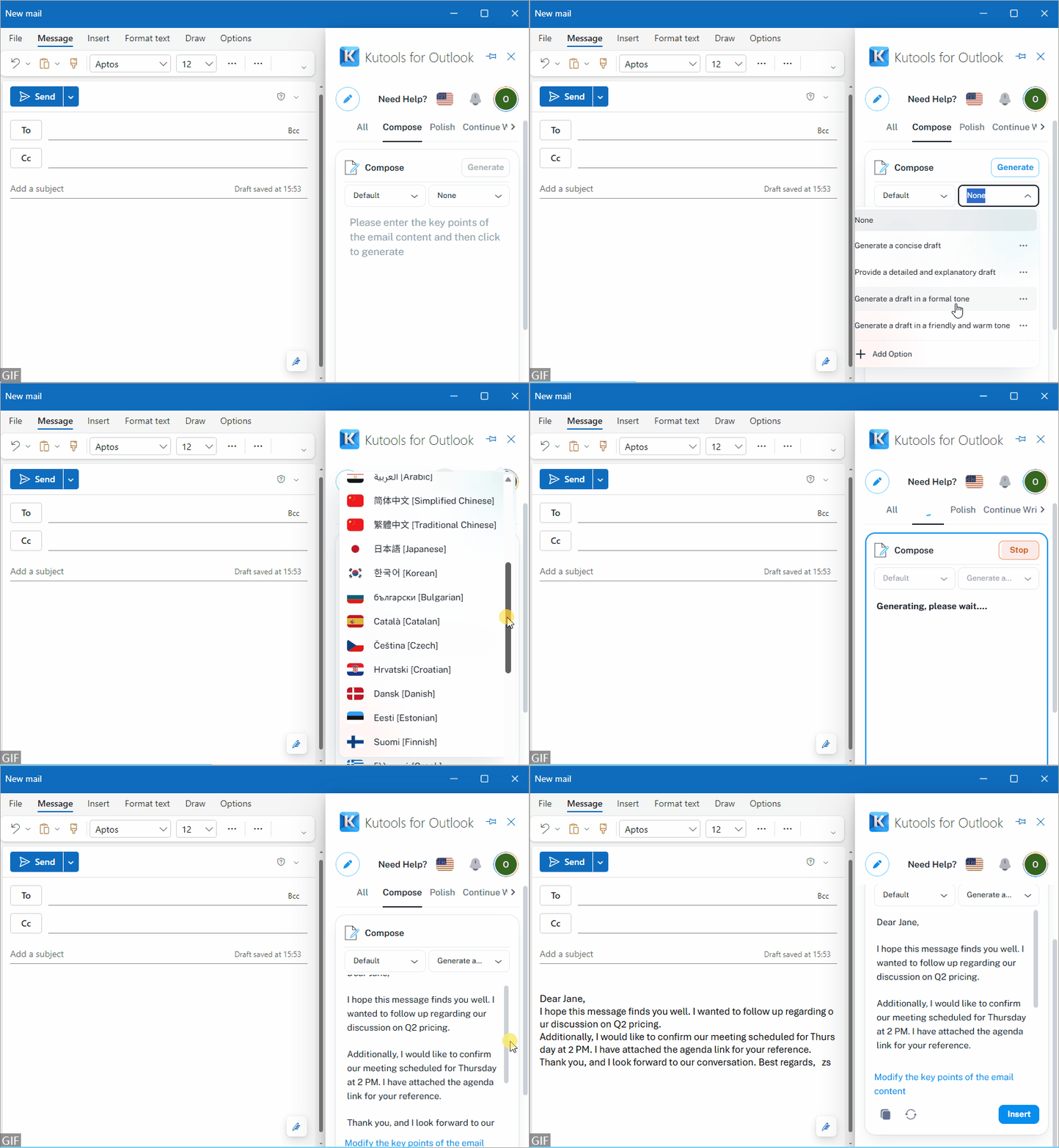
- Add details like recipient name, product, deadline, and CTA to get a sharper draft.
Beyond composing, Kutools for Outlook AI also offers:
- Reply — generate context-aware responses from the current message in one click.
- Translate — translate emails across languages without leaving Outlook.
- Polish — rewrite for tone, clarity, and grammar (formal, friendly, concise, etc.).
Install the add-in (New Outlook & Web Outlook)
A) New Outlook for Windows
- Open New Outlook and go to Home.
- Click Get Add-ins (sometimes shown as Apps or a "Store" icon).
- In the search box, type "Kutools for Outlook Online".
- Select the add-in Kutools for Outlook Online (AI) → Add.
- Sign in if prompted. You’ll see Kutools appear in the message toolbar/compose window.
B) Outlook on the web (Outlook.com or Microsoft 365)
- Open Outlook on the web.
- Click the Get Add-ins button (top bar) → search "Kutools for Outlook" → Add.
- Confirm sign-in. The Kutools button will appear in the compose/reply toolbar.
Free quota: You’ll get 500 free uses after installing. No credit card required to try.
Uninstall or update
- Go to Get Add-ins / Apps → My add-ins.
- Click More actions next to Kutools for Outlook Online → Remove (or update if shown).
FAQ
Q1: Does it work in classic desktop Outlook?
Yes, it works. However, if you’re on classic desktop Outlook, we recommend our desktop version of Kutools for Outlook. In addition to AI, it includes 100+ advanced features—such as Snooze, Schedule Send, and Reply with Attachments—with a free 30-day trial.
Q2: Will the AI see my entire mailbox?
The add-in only accesses content you actively open/use for drafting. Check the in-panel privacy notice and your tenant’s policies.
Best Office Productivity Tools
Experience the all-new Kutools for Outlook with 100+ incredible features! Click to download now!
📧 Email Automation: Auto Reply (Available for POP and IMAP) / Schedule Send Emails / Auto CC/BCC by Rules When Sending Email / Auto Forward (Advanced Rules) / Auto Add Greeting / Automatically Split Multi-Recipient Emails into Individual Messages ...
📨 Email Management: Recall Emails / Block Scam Emails by Subjects and Others / Delete Duplicate Emails / Advanced Search / Consolidate Folders ...
📁 Attachments Pro: Batch Save / Batch Detach / Batch Compress / Auto Save / Auto Detach / Auto Compress ...
🌟 Interface Magic: 😊More Pretty and Cool Emojis / Remind you when important emails come / Minimize Outlook Instead of Closing ...
👍 One-click Wonders: Reply All with Attachments / Anti-Phishing Emails / 🕘Show Sender's Time Zone ...
👩🏼🤝👩🏻 Contacts & Calendar: Batch Add Contacts From Selected Emails / Split a Contact Group to Individual Groups / Remove Birthday Reminders ...
Use Kutools in your preferred language – supports English, Spanish, German, French, Chinese, and 40+ others!


🚀 One-Click Download — Get All Office Add-ins
Strongly Recommended: Kutools for Office (5-in-1)
One click to download five installers at once — Kutools for Excel, Outlook, Word, PowerPoint and Office Tab Pro. Click to download now!
- ✅ One-click convenience: Download all five setup packages in a single action.
- 🚀 Ready for any Office task: Install the add-ins you need, when you need them.
- 🧰 Included: Kutools for Excel / Kutools for Outlook / Kutools for Word / Office Tab Pro / Kutools for PowerPoint
Table of contents
- Compose a new email with AI
- Install the add-in (New Outlook & Web Outlook)
- FAQ
- Related Articles
- Best Office Productivity Tools