How to Show Hidden Information of an Email in Outlook
Email messages contain much more information than what is displayed in the message body. Behind every email are hidden details such as internet headers, routing information, sender servers, authentication records, message IDs, MIME content, and other technical data.
Viewing this hidden information can help you troubleshoot delivery issues, verify senders, analyze suspicious emails, investigate spam, and better understand how a message traveled through the internet.
In this guide, you'll learn several ways to show the hidden information of an email in Outlook, including a faster and more convenient method using Kutools for Outlook.
View Internet Headers in Classic Outlook
Method 1: A built-in way to view email headers
Method 2: Show Hidden Information of Email with Kutools for Outlook
View Internet Headers in Classic Outlook
Method 1 A built-in way to view email headers
Steps
- Double-click the email to open it in a separate window.
- Click File > Info > Properties.
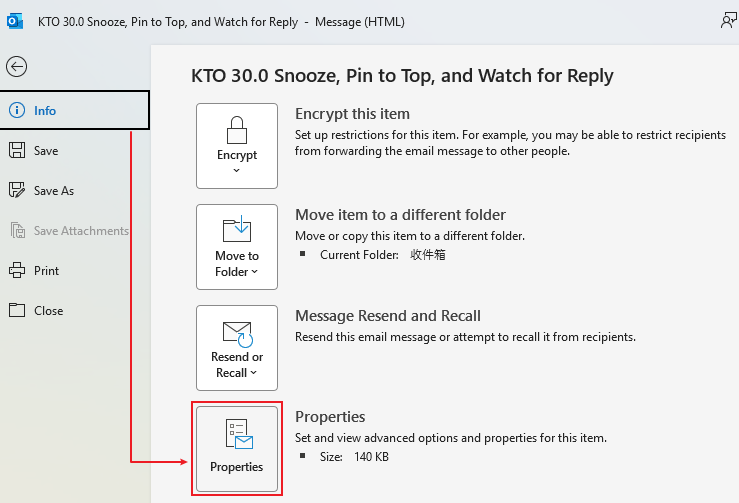
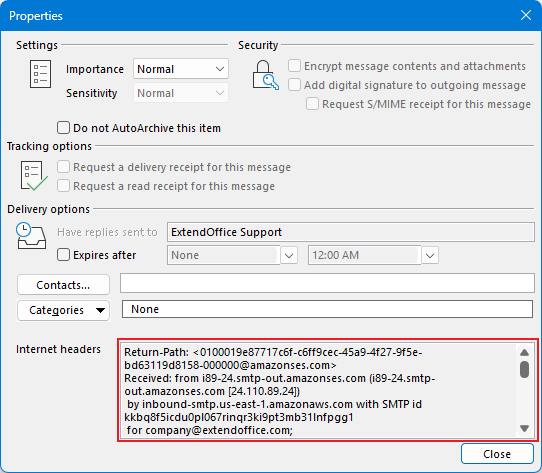
- Locate the Internet headers box at the bottom of the Properties window.
- Review the header information.
Limitations
- Only shows the header section.
- The information is displayed in a small text box.
- Difficult to read and analyze long headers.
- Requires several clicks to access.
Method 2: Show Hidden Information of Email with Kutools for Outlook
If you frequently need to inspect email headers and hidden message information, Kutools for Outlook provides a much more convenient solution.
Before using this feature, install Kutools for Outlook and activate the add-in.
Steps
- Select the email whose hidden information you want to view.
- Click:
Kutools > Utilities > Show Hidden Information of Email
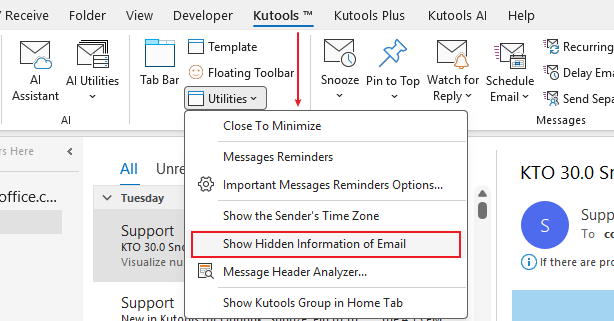
- The hidden information will be displayed in the preview window of the selected email for easy viewing and analysis.

For users who regularly handle email administration or security investigations, this feature can save significant time.
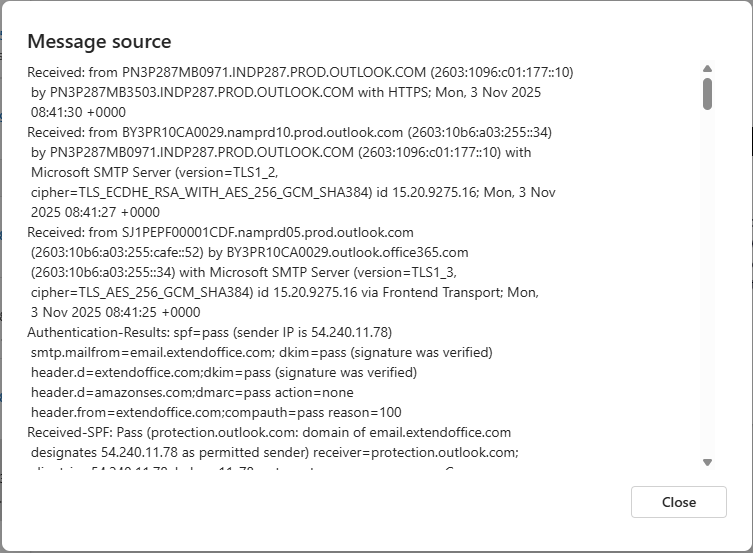
View Message Source in Outlook on the Web
If you use Outlook on the web, you can view the message source directly.
Steps
- Open the email.
- Click the More Actions (···) menu.
- Select View > View message details or View message source (depending on your version).
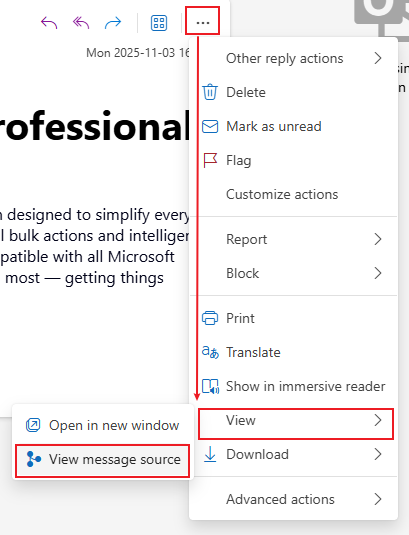
- Review the email source information.
Final Thoughts
Hidden email information contains valuable technical details that are often essential for troubleshooting, security analysis, and email verification.
While Outlook provides built-in ways to access message headers, the process can be cumbersome and difficult to use regularly.
Kutools for Outlook simplifies the entire experience with its Show Hidden Information of Email feature, allowing you to view important message details quickly and efficiently.
Beyond this feature, Kutools for Outlook includes 100+ powerful tools for email management, productivity, attachment handling, search, duplicate removal, AI-powered writing assistance, and much more.
You can download Kutools for Outlook and enjoy a 30-day free trial to explore all features and discover how much easier Outlook can be.
Best Office Productivity Tools
Experience the all-new Kutools for Outlook with 100+ incredible features! Click to download now!
📧 Email Automation: Auto Reply (Available for POP and IMAP) / Schedule Send Emails / Auto CC/BCC by Rules When Sending Email / Auto Forward (Advanced Rules) / Auto Add Greeting / Automatically Split Multi-Recipient Emails into Individual Messages ...
📨 Email Management: Recall Emails / Block Scam Emails by Subjects and Others / Delete Duplicate Emails / Advanced Search / Consolidate Folders ...
📁 Attachments Pro: Batch Save / Batch Detach / Batch Compress / Auto Save / Auto Detach / Auto Compress ...
🌟 Interface Magic: 😊More Pretty and Cool Emojis / Remind you when important emails come / Minimize Outlook Instead of Closing ...
👍 One-click Wonders: Reply All with Attachments / Anti-Phishing Emails / 🕘Show Sender's Time Zone ...
👩🏼🤝👩🏻 Contacts & Calendar: Batch Add Contacts From Selected Emails / Split a Contact Group to Individual Groups / Remove Birthday Reminders ...
Use Kutools in your preferred language – supports English, Spanish, German, French, Chinese, and 40+ others!


🚀 One-Click Download — Get All Office Add-ins
Strongly Recommended: Kutools for Office (5-in-1)
One click to download five installers at once — Kutools for Excel, Outlook, Word, PowerPoint and Office Tab Pro. Click to download now!
- ✅ One-click convenience: Download all five setup packages in a single action.
- 🚀 Ready for any Office task: Install the add-ins you need, when you need them.
- 🧰 Included: Kutools for Excel / Kutools for Outlook / Kutools for Word / Office Tab Pro / Kutools for PowerPoint
Table of contents
- View Internet Headers in Classic Outlook
- Method 1: A built-in way to view email headers
- Method 2: Show Hidden Information of Email with Kutools for Outlook
- View Message Source in Outlook on the Web
- Best Office Productivity Tools