Kutools for Outlook 27.00 – Release Notes
Kutools for Outlook 27.00 – Release Notes
Kutools for Outlook 27.00 is now available!
This release introduces a powerful new Symbols feature and delivers multiple enhancements across existing tools to make Outlook tasks easier, smarter, and more efficient.
New Features
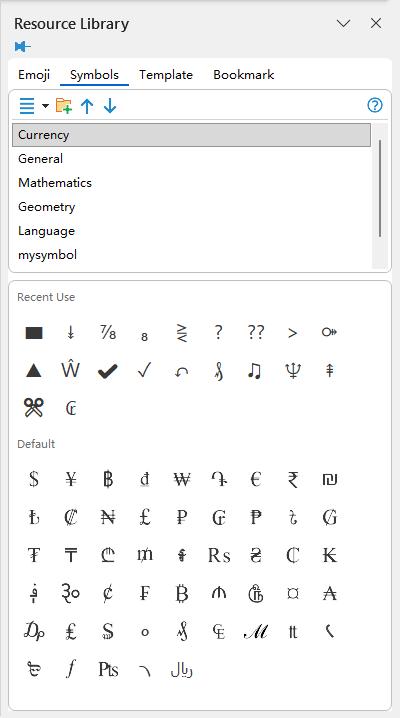
Symbols
- Fully customizable symbol library supporting custom categories, with options to add, rename, delete, and sort symbols.
- Richer symbol types, including characters, emojis, and special text—more flexible than Outlook’s built-in symbol options.
- Automatically records recently used symbols for faster reuse.
- Supports inserting symbols into plain text emails, which Outlook’s built-in symbol tool does not support.
Improvements
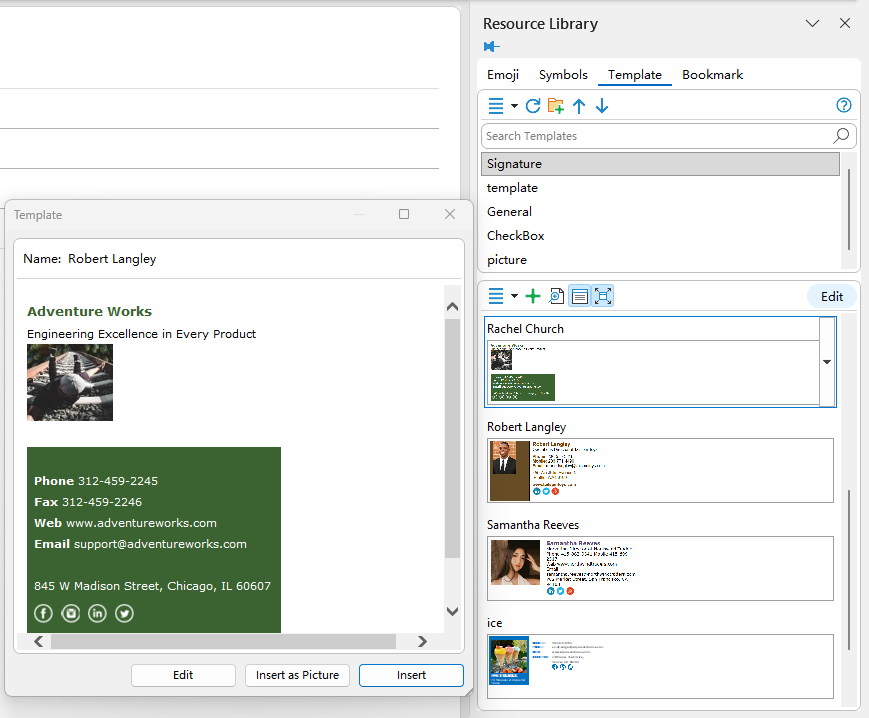
Templates (formerly AutoText)
- Create repetitive messages faster using reusable paragraphs, replies, greetings, tables, and more.
- Edit templates directly without recreating them—ideal for frequently updated content.
- Built-in search enables instant access, even with a large template library.
- Supports adding, deleting, renaming, and moving both categories and templates.
- Supports exporting and importing templates.
Remove Duplicate Emails from Selected Messages
- Automatically keeps the earliest email to preserve the most complete information.
Quick Scan & Delete Duplicate Emails
- Automatically keeps the earliest message; other duplicates are moved to Deleted Items.
Advanced Duplicate Scan & Processing
- Detects duplicate emails across folders or even across different mailboxes.
- Provides options to keep the earliest, the latest, or the folder-priority version.
Snooze
- Cleaner and more customizable list—choose which snooze times appear on the Ribbon.
- Add, delete, and reorder preferred snooze durations.
Schedule Send
- Manage which preset times appear in the list.
- Add, delete, and reorder frequently used send times.
Separate Send
- Supports inserting personalized greetings in both the subject and email body.
Upgrade now to unlock the new features and improvements designed to make your Outlook workflow faster and easier.
Best Office Productivity Tools
Experience the all-new Kutools for Outlook with 100+ incredible features! Click to download now!
📧 Email Automation: Auto Reply (Available for POP and IMAP) / Schedule Send Emails / Auto CC/BCC by Rules When Sending Email / Auto Forward (Advanced Rules) / Auto Add Greeting / Automatically Split Multi-Recipient Emails into Individual Messages ...
📨 Email Management: Recall Emails / Block Scam Emails by Subjects and Others / Delete Duplicate Emails / Advanced Search / Consolidate Folders ...
📁 Attachments Pro: Batch Save / Batch Detach / Batch Compress / Auto Save / Auto Detach / Auto Compress ...
🌟 Interface Magic: 😊More Pretty and Cool Emojis / Remind you when important emails come / Minimize Outlook Instead of Closing ...
👍 One-click Wonders: Reply All with Attachments / Anti-Phishing Emails / 🕘Show Sender's Time Zone ...
👩🏼🤝👩🏻 Contacts & Calendar: Batch Add Contacts From Selected Emails / Split a Contact Group to Individual Groups / Remove Birthday Reminders ...
Use Kutools in your preferred language – supports English, Spanish, German, French, Chinese, and 40+ others!


🚀 One-Click Download — Get All Office Add-ins
Strongly Recommended: Kutools for Office (5-in-1)
One click to download five installers at once — Kutools for Excel, Outlook, Word, PowerPoint and Office Tab Pro. Click to download now!
- ✅ One-click convenience: Download all five setup packages in a single action.
- 🚀 Ready for any Office task: Install the add-ins you need, when you need them.
- 🧰 Included: Kutools for Excel / Kutools for Outlook / Kutools for Word / Office Tab Pro / Kutools for PowerPoint