Kutools for Outlook 28.00 – Release Notes
Kutools for Outlook 28.00 – Release Notes
Kutools for Outlook 28.00 is now available!
This update introduces a highly requested new feature to improve email productivity in Classic Outlook, along with general stability improvements and bug fixes.
New Feature
Pin Emails to the Top (Classic Outlook)
Kutools for Outlook 28.00 adds a Pin to the Top feature for desktop (Classic) Outlook, making it easier to keep important emails always visible.
- Keep selected emails at the top
Pinned emails remain at the top of the message list, even when new emails arrive. - One-click pin and unpin
Quickly pin or unpin emails with a single click. - Restore original position
When unpinned, emails return to their original position in the message list. - Batch support
Pin or unpin multiple selected emails at once for efficient inbox management.
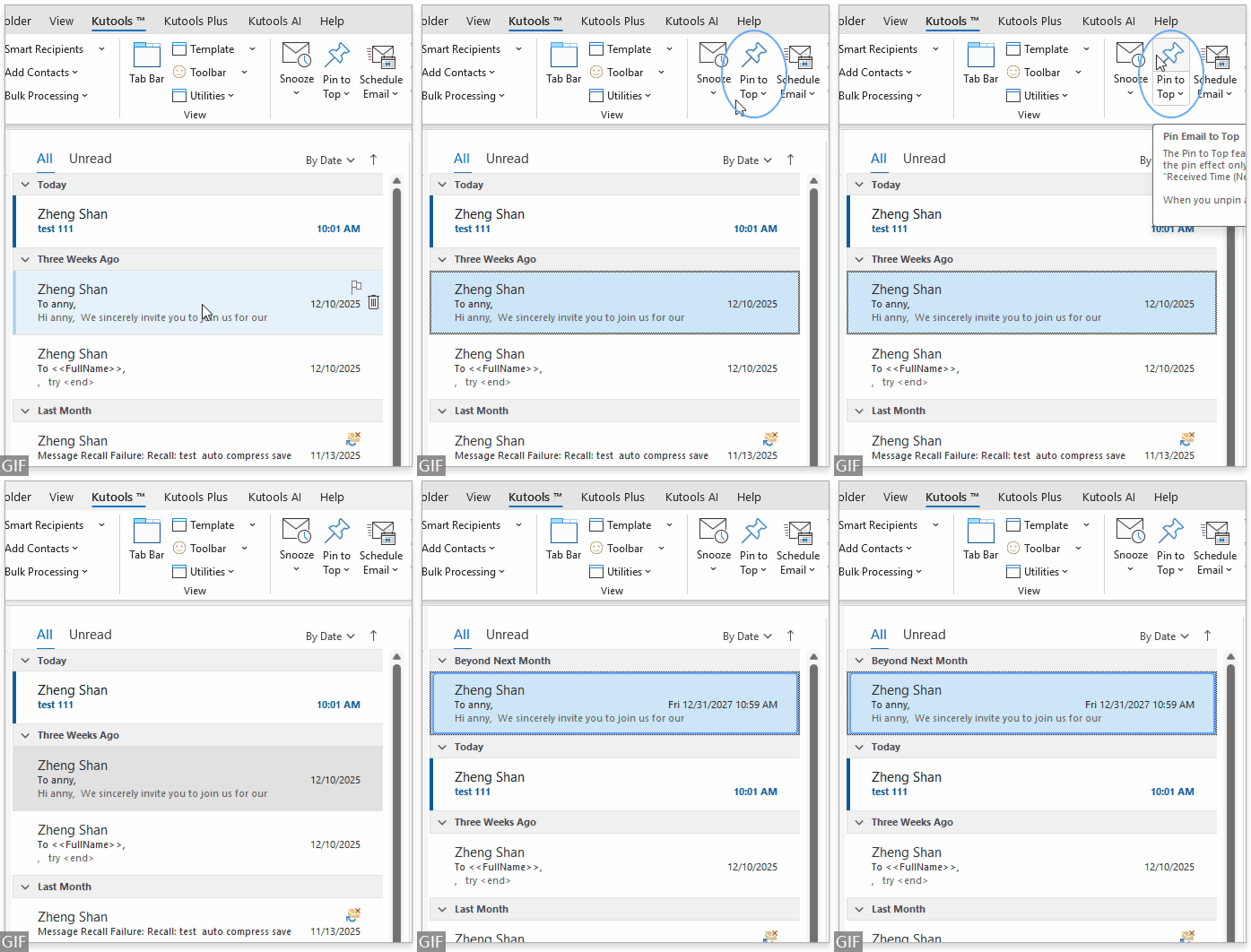
This feature helps prevent important messages from being buried and reduces the risk of missed follow-ups.
Improvements and Fixes
- Fixed several known bugs.
- Improved overall stability and performance.
Download and Try It Now
We recommend upgrading to Kutools for Outlook 28.00 to enjoy the new Pin feature and many other productivity tools.
Kutools for Outlook includes 100+ powerful features, all available with a 30-day free trial.
Best Office Productivity Tools
Experience the all-new Kutools for Outlook with 100+ incredible features! Click to download now!
📧 Email Automation: Auto Reply (Available for POP and IMAP) / Schedule Send Emails / Auto CC/BCC by Rules When Sending Email / Auto Forward (Advanced Rules) / Auto Add Greeting / Automatically Split Multi-Recipient Emails into Individual Messages ...
📨 Email Management: Recall Emails / Block Scam Emails by Subjects and Others / Delete Duplicate Emails / Advanced Search / Consolidate Folders ...
📁 Attachments Pro: Batch Save / Batch Detach / Batch Compress / Auto Save / Auto Detach / Auto Compress ...
🌟 Interface Magic: 😊More Pretty and Cool Emojis / Remind you when important emails come / Minimize Outlook Instead of Closing ...
👍 One-click Wonders: Reply All with Attachments / Anti-Phishing Emails / 🕘Show Sender's Time Zone ...
👩🏼🤝👩🏻 Contacts & Calendar: Batch Add Contacts From Selected Emails / Split a Contact Group to Individual Groups / Remove Birthday Reminders ...
Use Kutools in your preferred language – supports English, Spanish, German, French, Chinese, and 40+ others!


🚀 One-Click Download — Get All Office Add-ins
Strongly Recommended: Kutools for Office (5-in-1)
One click to download five installers at once — Kutools for Excel, Outlook, Word, PowerPoint and Office Tab Pro. Click to download now!
- ✅ One-click convenience: Download all five setup packages in a single action.
- 🚀 Ready for any Office task: Install the add-ins you need, when you need them.
- 🧰 Included: Kutools for Excel / Kutools for Outlook / Kutools for Word / Office Tab Pro / Kutools for PowerPoint