Kutools for Outlook 31.00 – Release Notes
Kutools for Outlook 31.00 – Release Notes
We’re excited to introduce Kutools for Outlook 31.00!
This release focuses on improving performance, stability, and usability across several frequently used features, including exporting emails, adding contacts, managing duplicate contacts, and Undo/Delay Send.
⚡ Improvements
📤 Save Selected Emails as PDF or Other File Formats
Improved performance and stability when exporting multiple selected emails to Excel or CSV.
👤 Add Senders and Multiple Recipients of Selected Emails to Contacts
Improved the recognition and processing performance when adding the senders and multiple recipients of selected emails to Contacts.
👥 Add Senders and Multiple Recipients of Selected Emails to Contact Groups
Improved the recognition and processing performance when adding the senders and multiple recipients of selected emails to Contact Groups.
🧹 Duplicate Contacts
Optimized the Duplicate Contacts feature with a simplified workflow and improved scanning and processing performance.
⏱ Undo/Delay Send
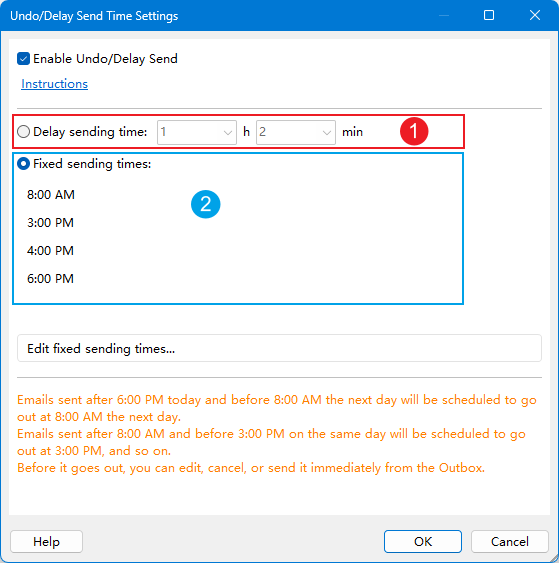
Improved the Undo/Delay Send feature with a more flexible email sending workflow, giving you greater control over when messages are actually sent.
- Added more flexible delay (undo) time settings, allowing you to specify the delay precisely in hours and minutes.
- Added a new Fixed Send Time option, allowing you to specify an exact time for emails to be sent.
🛠 Bug Fixes
- Fixed several other bugs to improve overall stability and user experience.
Upgrade to Kutools for Outlook 31.00
Kutools for Outlook 31.00 delivers faster, more reliable performance for exporting emails, managing contacts, removing duplicates, and controlling when messages are sent.
Best Office Productivity Tools
Experience the all-new Kutools for Outlook with 100+ incredible features! Click to download now!
📧 Email Automation: Auto Reply (Available for POP and IMAP) / Schedule Send Emails / Auto CC/BCC by Rules When Sending Email / Auto Forward (Advanced Rules) / Auto Add Greeting / Automatically Split Multi-Recipient Emails into Individual Messages ...
📨 Email Management: Recall Emails / Block Scam Emails by Subjects and Others / Delete Duplicate Emails / Advanced Search / Consolidate Folders ...
📁 Attachments Pro: Batch Save / Batch Detach / Batch Compress / Auto Save / Auto Detach / Auto Compress ...
🌟 Interface Magic: 😊More Pretty and Cool Emojis / Remind you when important emails come / Minimize Outlook Instead of Closing ...
👍 One-click Wonders: Reply All with Attachments / Anti-Phishing Emails / 🕘Show Sender's Time Zone ...
👩🏼🤝👩🏻 Contacts & Calendar: Batch Add Contacts From Selected Emails / Split a Contact Group to Individual Groups / Remove Birthday Reminders ...
Use Kutools in your preferred language – supports English, Spanish, German, French, Chinese, and 40+ others!


🚀 One-Click Download — Get All Office Add-ins
Strongly Recommended: Kutools for Office (5-in-1)
One click to download five installers at once — Kutools for Excel, Outlook, Word, PowerPoint and Office Tab Pro. Click to download now!
- ✅ One-click convenience: Download all five setup packages in a single action.
- 🚀 Ready for any Office task: Install the add-ins you need, when you need them.
- 🧰 Included: Kutools for Excel / Kutools for Outlook / Kutools for Word / Office Tab Pro / Kutools for PowerPoint