How to Block Email Body Content in Outlook (Stop Unwanted Messages Fast)
Unwanted emails don’t always come from unknown senders. Sometimes the sender looks legitimate, but the message contains repeated phrases, promotions, or spam content you no longer want to see. If you could block emails based on their message content, your inbox would stay far cleaner.
In this guide, you’ll learn how to block emails by body content in Outlook using built-in rules and a smarter, more efficient solution with Kutools for Outlook.
- Why and when Block Emails by Body Content?
- Method 1: Block Emails by Body Content Using Outlook Rules
- Method 2: Block Email Body Content with Kutools for Outlook (Best Solution)
Why and When Block Emails by Body Content?
Why Block Emails by Body Content?
Blocking by sender or domain isn’t always enough. Blocking by message body helps you:
- ✓ Stop recurring promotional messages
- ✓ Filter unwanted marketing phrases
- ✓ Block repetitive spam content
- ✓ Reduce inbox noise without blocking entire contacts
When Should You Block Emails by Body Content?
This feature is especially helpful if you:
- ✓ Receive repeated marketing emails with similar text
- ✓ Want to block internal system notifications with specific phrases
- ✓ Need to filter unwanted newsletters without unsubscribing
- ✓ Want smarter spam control beyond sender blocking
Method 1: Block Emails by Body Content Using Outlook Rules
Outlook can filter emails based on specific words or phrases found in the message body.
- Open Outlook.
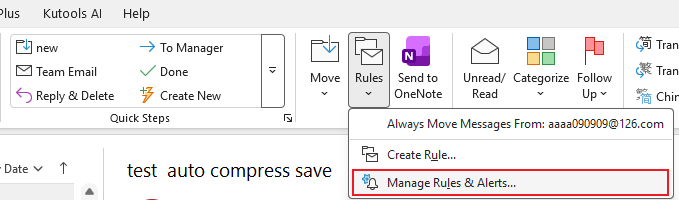
- Go to Home → Rules → Manage Rules & Alerts.
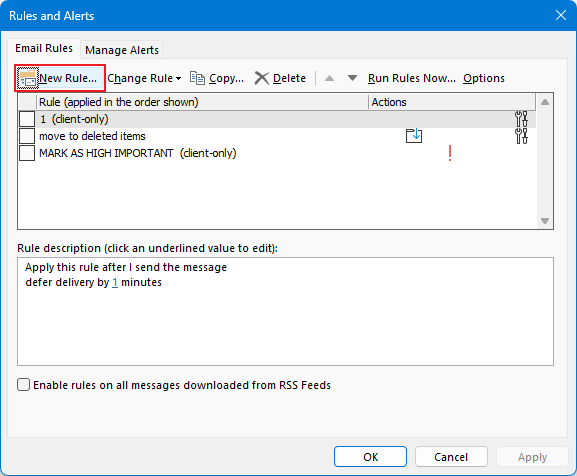
- Click New Rule.
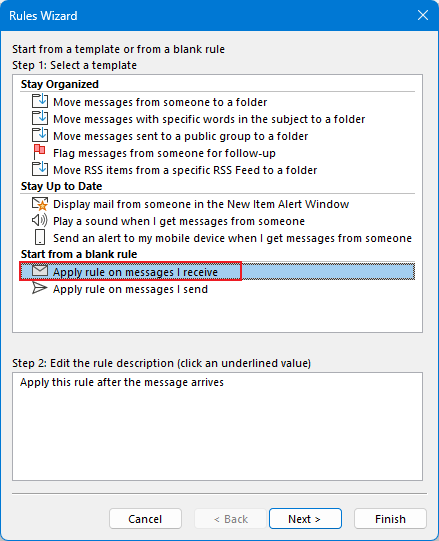
- Select Apply rule on messages I receive, then click Next.
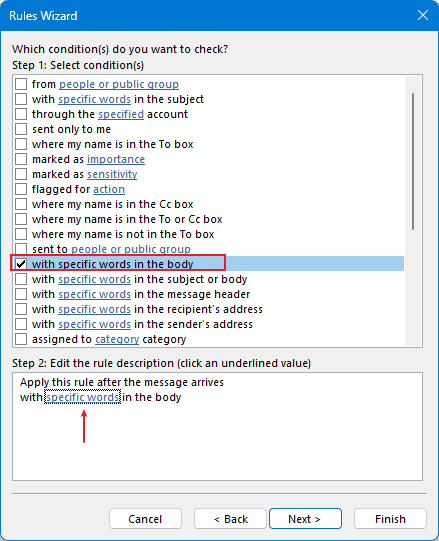
- Check with specific words in the body.
- Click the link specific words, add keywords/phrases, then click OK.
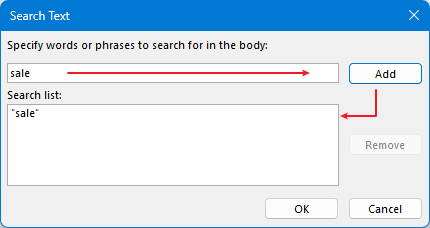
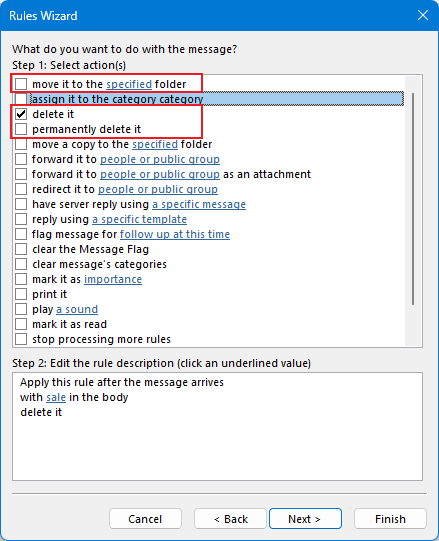
- Choose an action (e.g., delete, move to Junk, or move to a folder).
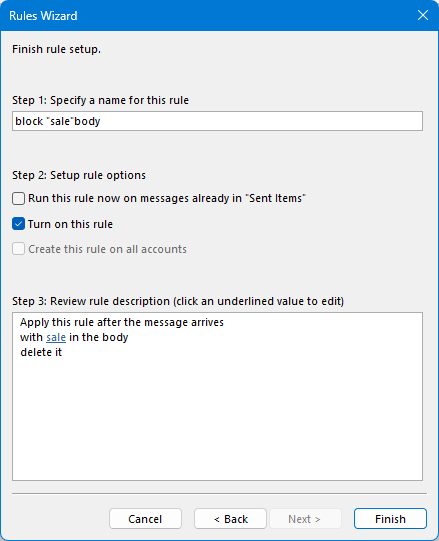
- Finish the rule and apply it.
Limitations: Rules can become hard to manage, especially with many phrases, and they’re not as convenient to enable/disable or review in one place.
Method 2: Block Email Body Content with Kutools for Outlook (Best Solution)
Kutools for Outlook provides a dedicated Block Body feature that allows you to automatically block emails containing specific text in the message body — without creating complicated rules.
How to Block Emails by Body Content with Kutools
Download Kutools for Outlook
Work faster in Outlook with 100+ powerful tools—smarter junk filtering, bulk cleanup, attachment helpers, and time-saving email features in one add-in.
- Install and open Kutools for Outlook.
- Select an email that contains unwanted content.
- Go to Kutools tab → Junk → Block Body.
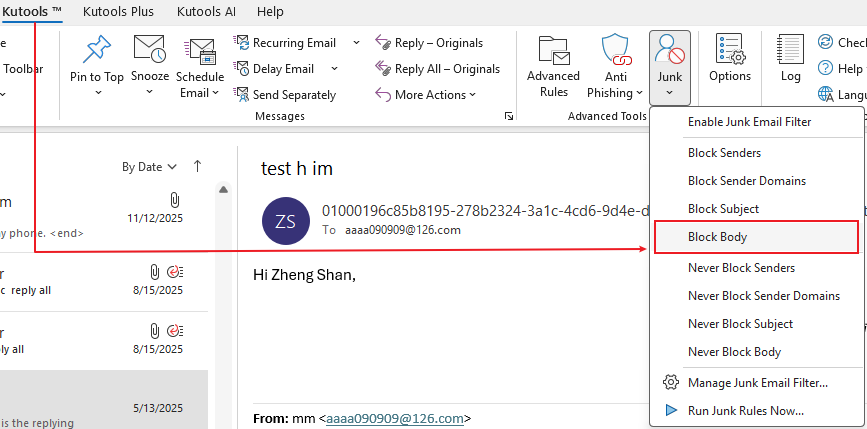
- Confirm the body text to block.
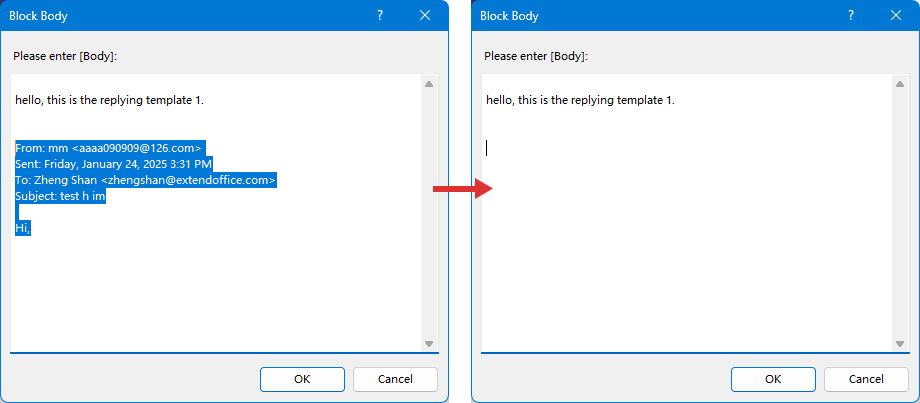
- Click OK.
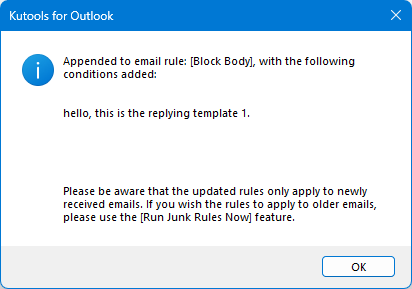
From now on, emails containing that body content will be automatically filtered.
⭐ Advantages of Kutools Block Body Feature
- ✔Block emails based on message content instantly
- ✔No complicated rule setup required
- ✔Manage block rules easily in one place
- ✔Works with phrases, patterns, and repeated spam content
- ✔Faster and more efficient than Outlook rules
- ✔Toggle rules on/off anytime
👉 Instead of building complex rule chains, you can block unwanted content in seconds.
Bonus: Manage and Edit Blocked Body Rules
- Go to Kutools → Junk → Junk Email Filter Manager
- View, edit, enable, or disable rules
- Remove outdated block phrases anytime
This centralized control makes email filtering far more efficient.
Why Kutools for Outlook Makes Email Management Easier
While Outlook’s built-in tools are useful, Kutools for Outlook takes email management to the next level with 100+ powerful features designed to boost productivity.
- Block spam intelligently
- Auto-reply and schedule emails
- Remove duplicate emails
- Manage attachments efficiently
- Use AI-powered email drafting tools
- Organize and clean your mailbox in seconds
👉 If you manage a busy inbox, Kutools can save hours every week.
Download Kutools for Outlook and Take Control of Your Inbox
If you want smarter filtering, faster organization, and advanced email tools, Kutools for Outlook is a must-have.
- ✔ Free trial available
- ✔ Easy setup
- ✔ Powerful productivity features
Final Thoughts
Blocking emails by body content is one of the most effective ways to reduce inbox clutter. While Outlook rules can help, Kutools for Outlook provides a faster, smarter, and more flexible solution.
Start blocking unwanted content in seconds — and enjoy a distraction-free inbox.
Best Office Productivity Tools
Experience the all-new Kutools for Outlook with 100+ incredible features! Click to download now!
📧 Email Automation: Auto Reply (Available for POP and IMAP) / Schedule Send Emails / Auto CC/BCC by Rules When Sending Email / Auto Forward (Advanced Rules) / Auto Add Greeting / Automatically Split Multi-Recipient Emails into Individual Messages ...
📨 Email Management: Recall Emails / Block Scam Emails by Subjects and Others / Delete Duplicate Emails / Advanced Search / Consolidate Folders ...
📁 Attachments Pro: Batch Save / Batch Detach / Batch Compress / Auto Save / Auto Detach / Auto Compress ...
🌟 Interface Magic: 😊More Pretty and Cool Emojis / Remind you when important emails come / Minimize Outlook Instead of Closing ...
👍 One-click Wonders: Reply All with Attachments / Anti-Phishing Emails / 🕘Show Sender's Time Zone ...
👩🏼🤝👩🏻 Contacts & Calendar: Batch Add Contacts From Selected Emails / Split a Contact Group to Individual Groups / Remove Birthday Reminders ...
Use Kutools in your preferred language – supports English, Spanish, German, French, Chinese, and 40+ others!


🚀 One-Click Download — Get All Office Add-ins
Strongly Recommended: Kutools for Office (5-in-1)
One click to download five installers at once — Kutools for Excel, Outlook, Word, PowerPoint and Office Tab Pro. Click to download now!
- ✅ One-click convenience: Download all five setup packages in a single action.
- 🚀 Ready for any Office task: Install the add-ins you need, when you need them.
- 🧰 Included: Kutools for Excel / Kutools for Outlook / Kutools for Word / Office Tab Pro / Kutools for PowerPoint
Table of contents
- Why and when Block Emails by Body Conten
- Block Emails by Body Content Using Outlook Rules
- Block Email Body Content with Kutools for Outlook
- Related Articles
- Best Office Productivity Tools