Generate content based on prompts in Word using Kutools AI
Many Word users rely on AI to help them create written content more quickly - whether it’s drafting emails, structuring work reports, generating blog-style text, preparing outlines, or producing social-media snippets. Instead of starting from a blank page, AI can instantly turn a short prompt into a polished first draft.
Kutools for Word brings AI-powered content creation directly into Word through its Compose tool. You can describe what you want to write in plain language, and Kutools AI will generate the content for you. The tutorial below shows how to generate content based on prompts using Kutools AI.
Step-by-step guide to generate content based on prompts using Kutools for Word
- Open your Word document, then on the Kutools tab, click AI > AI Utilities to display the Kutools AI Utilities pane.
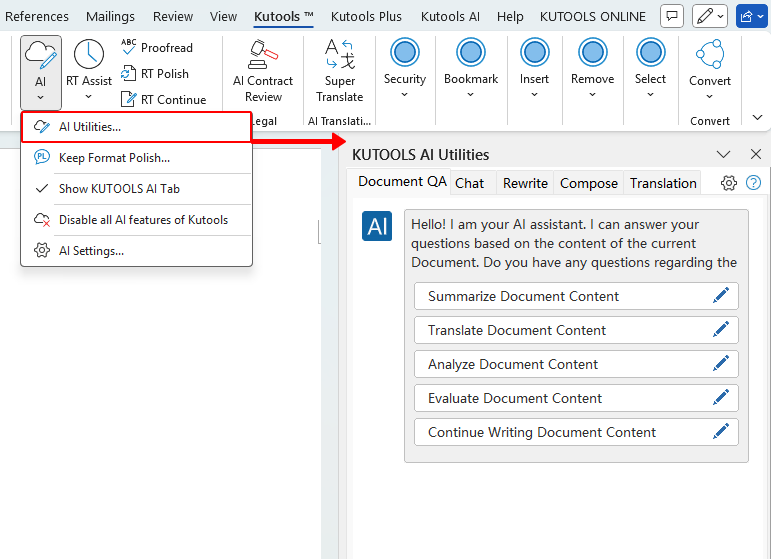
- In the AI Utilities pane, select the Compose tab to access the Compose tool.
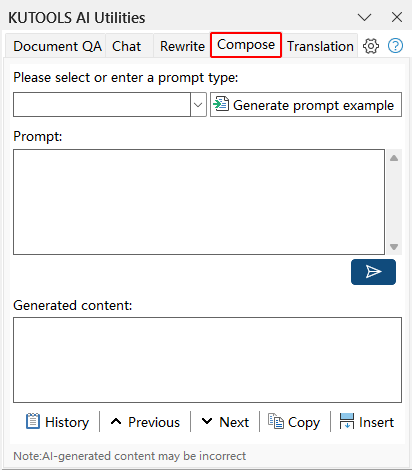
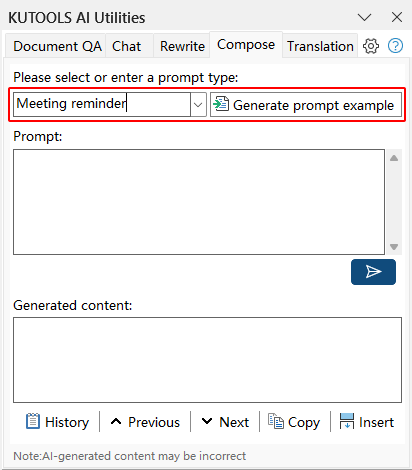
- In the “Please select or enter a prompt type:” box, enter a prompt type - such as “product introduction,” “meeting reminder,” or “project update” - and click the Generate prompt example button to let Kutools generate a prompt for you. Tip: If you already have your own prompt, skip this step and enter it directly in the Prompt box.
- In the "Prompt" box, edit the generated prompt, or enter your own prompt describing what content you want to create. Once done, click the Send button
 .
.
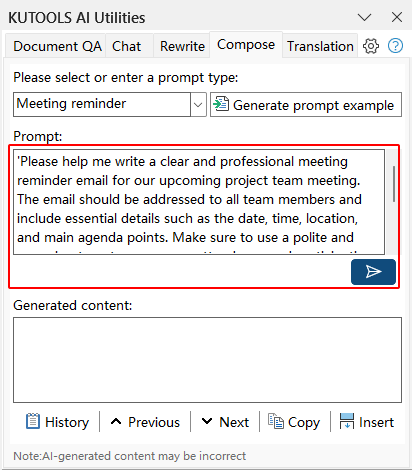
- Kutools AI will create content based on your prompt and display the result in the "Generated content" box. Review the generated text to ensure it suits the style, tone, or length you expected.
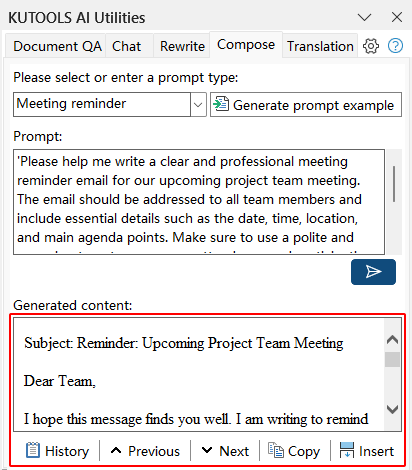
- If you're satisfied with the generated text, click Insert to add it directly to your document at the cursor position, or choose Copy to paste it manually wherever you like. If the result needs refining, adjust your prompt and click the Send button again to regenerate content.
 .
.
Note: Make sure Kutools AI is activated with a valid AI provider (such as OpenAI or Google AI) and that you are using a Kutools for Word version that includes the AI Utilities pane.
Best Office Productivity Tools
Kutools for Word - Elevate Your Word Experience
🤖 Kutools AI Features: AI Assistant / Real-Time Assistant / Super Polish (Preserve Format) / Super Translate (Preserve Format) / AI Redaction / AI Proofread...
📘 Document Mastery: Split Pages / Merge Documents / Export Selection in Various Formats (PDF/TXT/DOC/HTML...) / Batch Convert to PDF...
✏ Contents Editing: Batch Find and Replace across Multiple Files / Resize All Pictures / Transpose Table Rows and Columns / Convert Table to Text...
🧹 Effortless Clean: Sweap away Extra Spaces / Section Breaks / Text Boxes / Hyperlinks / For more removing tools, head to the Remove group...
➕ Creative Inserts: Insert Thousand Separators / Check Boxes / Radio Buttons / QR Code / Barcode / Multiple Pictures / Discover more in the Insert group...
🔍 Precision Selections: Pinpoint Specific Pages / Tables / Shapes / Heading Paragraphs / Enhance navigation with more Select features...
⭐ Star Enhancements: Navigate to Any Location / Auto-Insert Repetitive Text / Toggle Between Document Windows / 11 Conversion Tools...
🌍 Supports 40+ Languages: Use Kutools in your preferred language – supports English, Spanish, German, French, Chinese, and 40+ others!

Office Tab - Tabs for Office, Power for You
- Enable tabbed editing and reading in Word, Excel, PowerPoint, Publisher, Access, Visio and Project.
- Open and create multiple documents in new tabs of the same window, rather than in new windows.
- Increases your productivity by 50%, and reduces hundreds of mouse clicks for you every day!

✨ Kutools for Office – One Installation, Five Powerful Tools!
Includes Office Tab Pro · Kutools for Excel · Kutools for Outlook · Kutools for Word · Kutools for PowerPoint
📦 Get all 5 tools in one suite | 🔗 Seamless integration with Microsoft Office | ⚡ Save time and boost productivity instantly
Best Office Productivity Tools
Kutools for Word - 100+ Tools for Word
- 🤖 Kutools AI Features: AI Assistant / Real-Time Assistant / Super Polish / Super Translate / AI Redaction / AI Proofread
- 📘 Document Mastery: Split Pages / Merge Documents / Batch Convert to PDF
- ✏ Contents Editing: Batch Find and Replace / Resize All Pictures
- 🧹 Effortless Clean: Remove Extra Spaces / Remove Section Breaks
- ➕ Creative Inserts: Insert Thousand Separators / Insert Check Boxes / Create QR Codes
- 🌍 Supports 40+ Languages: Kutools speaks your language – 40+ languages supported!
Table of Contents
Kutools for Word
Brings 100+ advanced features to Word
- 🧩 Overview
- 📥 Free Download
- 🛒 Purchase Now
- 🎁 60-Day Free Trial available