Batch Calculate Age from Dates of Birth in Excel with Formula Helper Plus
When working with employee, customer, or student records, calculating ages one row at a time can be inefficient. Formula Helper Plus allows you to batch generate age formulas for an entire range of birth dates, making it much faster to process large worksheets.
Advantages of Formula Helper Plus
Formula Helper Plus simplifies batch age calculation in Excel. Its main advantages include:
Batch Calculate Ages for Multiple Birth Dates
The following example demonstrates how to calculate ages for every employee in the worksheet at once.
Step 1. Select the output cell
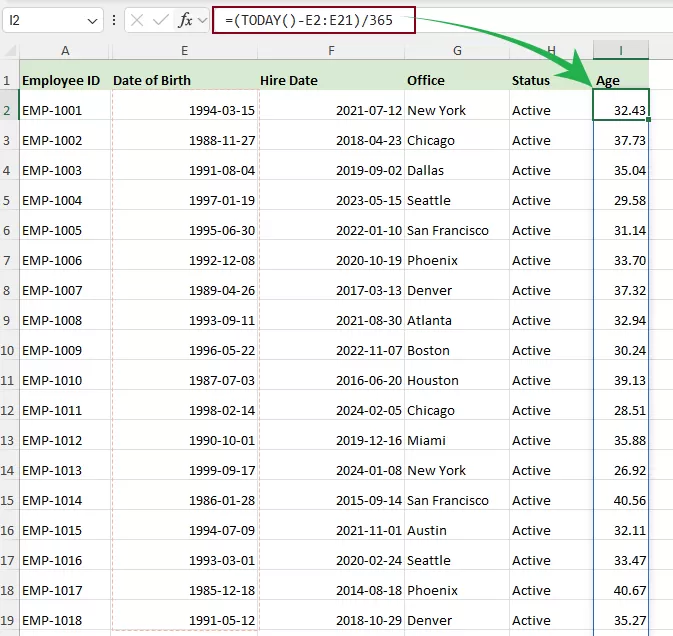
Click the cell where the first calculated age should appear. In this example, select I2 in the Age column.
Step 2. Open Formula Helper Plus
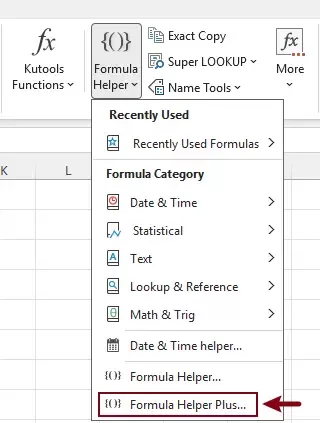
Go to Kutools > Formula Helper > Formula Helper Plus.
Step 3. Configure the Formula Helper Plus dialog box
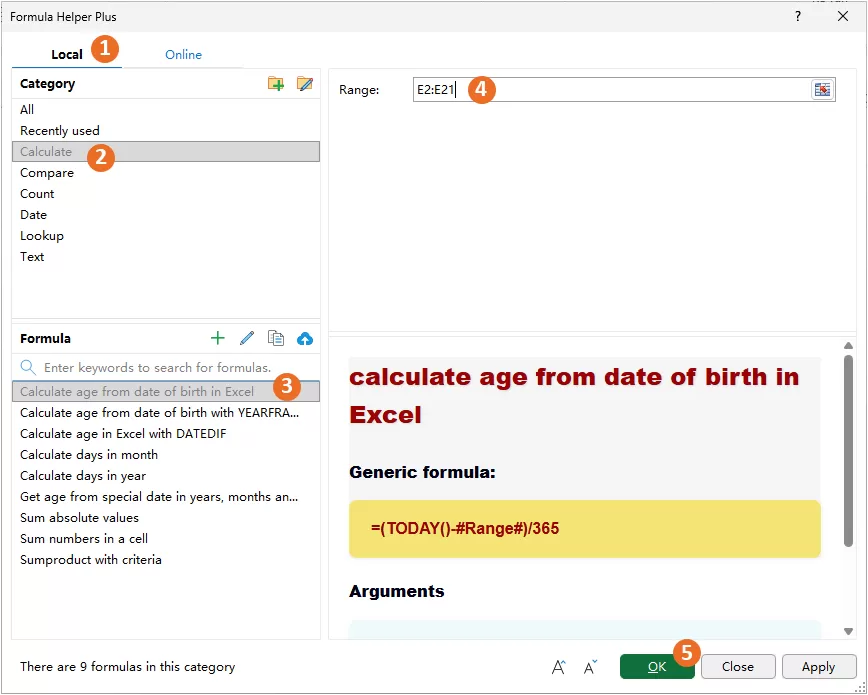
- Shift to the Local tab.
- Select the Calculate category.
- In the Formula list, choose Calculate age from date of birth in Excel.
- Select the entire birth date range in the Range argument box.
- Click OK.
Result
Formula Helper Plus automatically fills the selected output range with the calculated ages by using a dynamic array formula.
Frequently Asked Questions
The following questions address common concerns about batch age calculation with Formula Helper Plus.
Can I calculate ages for multiple birth dates at once?
Yes. Formula Helper Plus inserts a single dynamic array formula that returns the calculated ages for the entire selected birth date range.
Why is there only one formula in the output range?
Formula Helper Plus uses Excel's dynamic array functionality. Instead of inserting a separate formula into every row, it places one formula in the first output cell, and Excel automatically spills the results into the remaining cells.
Can I edit one of the calculated cells individually?
No. The spilled results belong to the same dynamic array formula. To change the calculation, edit the formula in the first output cell.
Will the calculated ages update automatically?
Yes. Because the results are generated by an Excel formula, the calculated ages update automatically whenever the workbook recalculates.
Can I use this feature with larger datasets?
Yes. Simply select a larger birth date range and the corresponding output range. Formula Helper Plus generates one dynamic array formula to calculate all selected records at once.
Conclusion
Formula Helper Plus provides a fast and efficient way to batch calculate ages from birth dates in Excel. Instead of generating a formula for one cell and copying it throughout the worksheet, you can process an entire range in a single operation.
Whether you're maintaining employee records, customer databases, student information, or membership lists, Formula Helper Plus helps you generate age formulas quickly, reduce repetitive work, and improve accuracy when working with large datasets.
Best Office Productivity Tools
Supercharge Your Excel Skills with Kutools for Excel, and Experience Efficiency Like Never Before. Kutools for Excel Offers Over 300 Advanced Features to Boost Productivity and Save Time. Click Here to Get The Feature You Need The Most...
Office Tab Brings Tabbed interface to Office, and Make Your Work Much Easier
- Enable tabbed editing and reading in Word, Excel, PowerPoint, Publisher, Access, Visio and Project.
- Open and create multiple documents in new tabs of the same window, rather than in new windows.
- Increases your productivity by 50%, and reduces hundreds of mouse clicks for you every day!
All Kutools add-ins. One installer
Kutools for Office suite bundles add-ins for Excel, Word, Outlook & PowerPoint plus Office Tab Pro, which is ideal for teams working across Office apps.





- All-in-one suite — Excel, Word, Outlook & PowerPoint add-ins + Office Tab Pro
- One installer, one license — set up in minutes (MSI-ready)
- Works better together — streamlined productivity across Office apps
- 30-day full-featured trial — no registration, no credit card
- Best value — save vs buying individual add-in
Table of contents
- Advantages of Formula Helper Plus
- Batch Calculate Ages for Multiple Birth Dates
- FAQ
- Conclusion
- The Best Office Productivity Tools
Kutools for Excel
Brings 300+ powerful features to streamline your Excel tasks.
- ⬇️ Free Download
- 🛒 Purchase Now
- 📘 Feature Tutorials
- 🎁 30-Day Free Trial