Count Unique Text Values in Excel with Formula Helper Plus
When a range contains repeated text entries, numbers, blank cells, or a mixture of different data types, counting only the text values that appear exactly once can require a relatively complex Excel formula.
The Count unique text values in Excel formula in Formula Helper Plus simplifies this task. You only need to specify the range to analyze, and Formula Helper Plus generates the required formula automatically.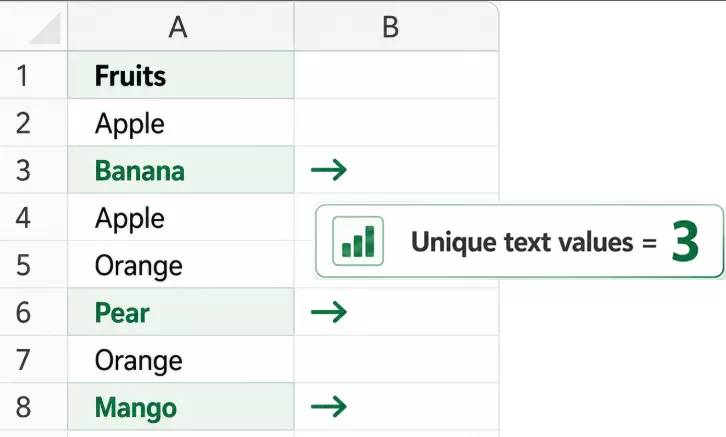
What Does Unique Text Values Mean?
A unique text value is a text entry that occurs only once within the selected range.
For example:
| Value | Counted as Unique Text? |
|---|---|
| Apple | No |
| Banana | Yes |
| Apple | No |
| Orange | Yes |
| 100 | No |
| Pear | Yes |
In this example:
- Apple appears twice, so it is not counted.
- Banana, Orange, and Pear each appear once, so they are counted.
- 100 is a numeric value, so it is ignored.
Therefore, the result is: 3.
Note: This feature counts text values that occur exactly once. It does not simply count the number of different text values.
Advantages of Using Formula Helper Plus
No need to remember a complex formula – Simply select the range you want to analyze.
Counts text only – Numeric values are excluded from the result.
Identifies values occurring exactly once – Repeated text entries are not counted.
Reduces formula-entry errors – Formula Helper Plus builds the formula automatically.
Easy formula search – You can locate the formula by category or enter keywords in the search box.
Provides a large collection of useful formulas - Formula Helper Plus includes many commonly used and more complex formulas for calculations, comparisons, counting, dates, lookups, text processing, and other Excel tasks.
Convenient for repeated Excel tasks – Frequently used formulas are available from one formula library.
How to Use Count Unique Text Values in Excel?
Suppose column A contains a list of employee names, and you want to find how many names occur only once. 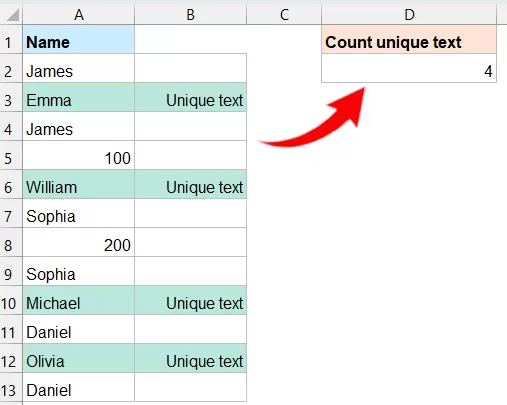
Steps:
- Select a blank cell where you want to return the result.
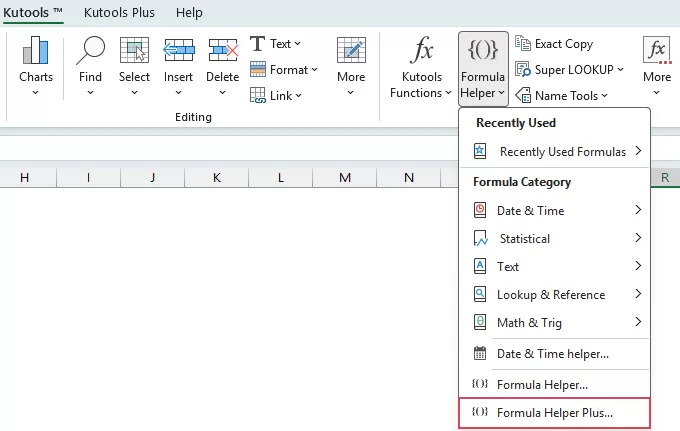
- Click Kutools > Formula Helper > Formula Helper Plus.
- In the Formula Helper Plus dialog box, select the Local tab. Then, specify the following operations:
- In the Category section, select Count.
- From the formula list, select Count unique text values in Excel. (You can also enter keywords such as unique in the search box to locate the formula more quickly.)
- In the Range box, select the cells containing the values you want to count unique text.
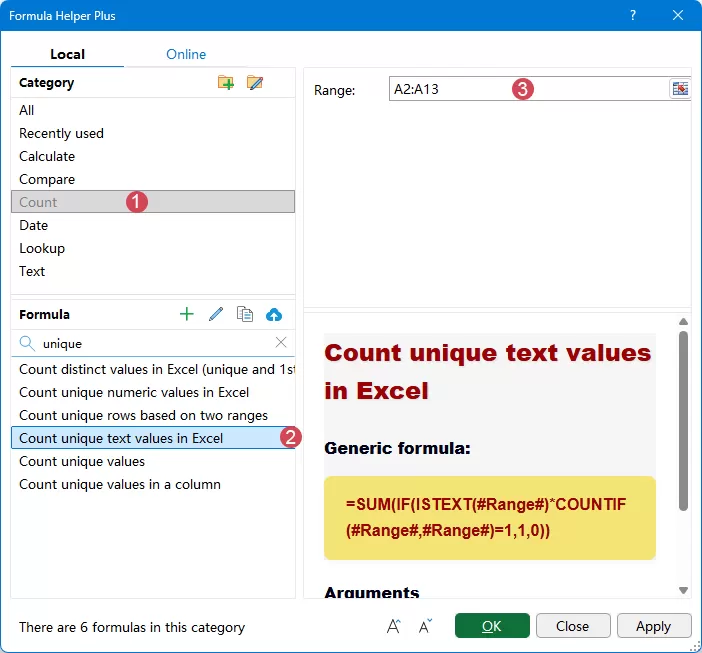
- Click OK.
Result:
Formula Helper Plus inserts the corresponding formula into the selected cell and returns the number of text values that occur exactly once in the specified range.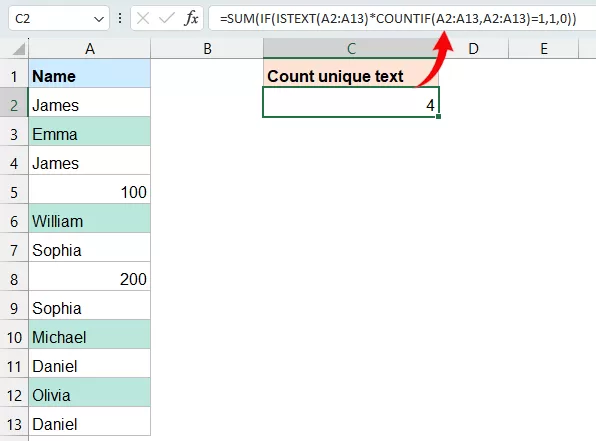
Important Notes
1. Numbers are not counted: The formula uses the ISTEXT function, so numeric values are excluded even if they occur only once.
2. Repeated text is excluded completely: If a text value occurs two or more times, none of its occurrences are counted.
3. Blank cells are not counted: Empty cells do not contain text and therefore are not included in the result.
4. Numbers stored as text may be counted: If a value such as 100 is stored as text rather than as a numeric value, Excel's ISTEXT function recognizes it as text. If it occurs only once, it can therefore be included in the result.
Unique Text Values vs. Distinct Text Values
Although unique text values and distinct text values sound similar, they refer to different counting rules in Excel.
| Type | Meaning | Example Result |
|---|---|---|
| Unique Text Values | Counts only text values that appear exactly once in the range. | Apple, Apple, Banana, Orange, Orange → 1 |
| Distinct Text Values | Counts each different text value once, regardless of how many times it appears. | Apple, Apple, Banana, Orange, Orange → 3 |
So, use Count unique text values in Excel when you want to find how many text entries have no duplicates. Use a distinct-value count when you want to know how many different text entries exist in the range.
Frequently Asked Questions
1. What does Count unique text values in Excel actually count?
It counts text values that occur exactly once in the specified range. Repeated text, ordinary numeric values, and blank cells are excluded.
2. Why is my result different from the number of different text entries?
This feature counts unique values, meaning text entries that appear exactly once. It is different from counting distinct values, where every different value is counted once even if it occurs multiple times.
3. Why are two apparently identical values being counted separately?
One of the values may contain hidden or extra spaces or other differences in the underlying text. Check the source cells and clean the data if necessary.
4. Will the result change when the source data changes?
Because Formula Helper Plus inserts an Excel formula into the result cell, the calculated result can update when the referenced source data changes.
Conclusion
Counting text values that occur only once can require a relatively complex Excel formula, especially when the range also contains repeated entries, numbers, or blank cells.
With Kutools for Excel's Formula Helper Plus, the Count unique text values in Excel formula simplifies the process. Simply select the formula, specify the Range, and Formula Helper Plus generates the required calculation for you.
Remember that unique text values are different from distinct text values: unique values occur only once, while distinct values represent all different entries regardless of how many times they appear.
Best Office Productivity Tools
Supercharge Your Excel Skills with Kutools for Excel, and Experience Efficiency Like Never Before. Kutools for Excel Offers Over 300 Advanced Features to Boost Productivity and Save Time. Click Here to Get The Feature You Need The Most...
Office Tab Brings Tabbed interface to Office, and Make Your Work Much Easier
- Enable tabbed editing and reading in Word, Excel, PowerPoint, Publisher, Access, Visio and Project.
- Open and create multiple documents in new tabs of the same window, rather than in new windows.
- Increases your productivity by 50%, and reduces hundreds of mouse clicks for you every day!
All Kutools add-ins. One installer
Kutools for Office suite bundles add-ins for Excel, Word, Outlook & PowerPoint plus Office Tab Pro, which is ideal for teams working across Office apps.





- All-in-one suite — Excel, Word, Outlook & PowerPoint add-ins + Office Tab Pro
- One installer, one license — set up in minutes (MSI-ready)
- Works better together — streamlined productivity across Office apps
- 30-day full-featured trial — no registration, no credit card
- Best value — save vs buying individual add-in