Kutools for Excel 33.00 - Release notes
Release Notes – Kutools for Excel 33.00
The latest version of Kutools for Excel 33.00 is now available!
This update introduces several powerful new tools and AI-powered enhancements to make Excel smarter, more visual, and more efficient than ever. It also brings a series of interface upgrades, performance optimizations, and stability improvements to ensure a smoother user experience.
Download or upgrade now to try Kutools for Excel 33.00 free!
Tip: full function & feature, free trial in 30 days! If your 2-year free upgrade support period hasn’t expired, you are entitled to a free upgrade.
New Features
- Number Format Preview
Automatically applies temporary highlight colors to cells based on their formatting styles in visible ranges, helping you quickly identify formatting differences and modify formatting properties in bulk for faster format management.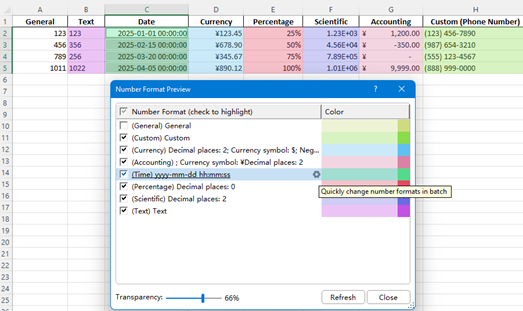
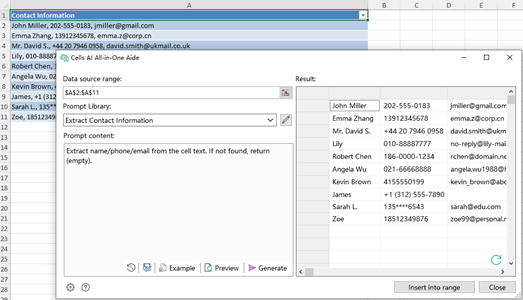
- Cell Aide
A powerful Cell Aide that intelligently analyzes, transforms, and standardizes cell data across a selected range — all in one place.Core capabilities include:
- Data extraction & recognition: Accurately extract key details such as dates, contact information, and company names from cell content.
- Content analysis: Summarize, categorize, or extract key points from large text entries.
- Text processing: Instantly translate, polish, or generate replies to improve clarity and consistency.
- Data cleaning & standardization: Automatically normalize data formats and ensure uniform structure across datasets.
- Custom AI workflows: Create personalized AI-powered cell processing rules based on your specific needs.
- Color Picker
Quickly capture any color from anywhere on your worksheet and automatically add it to Excel’s Recent Colors palette for instant reuse. - Insert Bullets
Quickly insert bullet symbols into multiple cells at once — ideal for formatting lists and improving visual organization. - Simple VLOOKUP
A more intuitive VLOOKUP wizard that completes setup in just three steps and delivers results instantly, without memorizing formulas. - Duplicate selected worksheet(s)
Quickly duplicate one or multiple selected worksheets with a single right-click. Simply right-click the sheet tab and choose Duplicate — the copied worksheet(s) will be placed immediately after the original.


Improvements
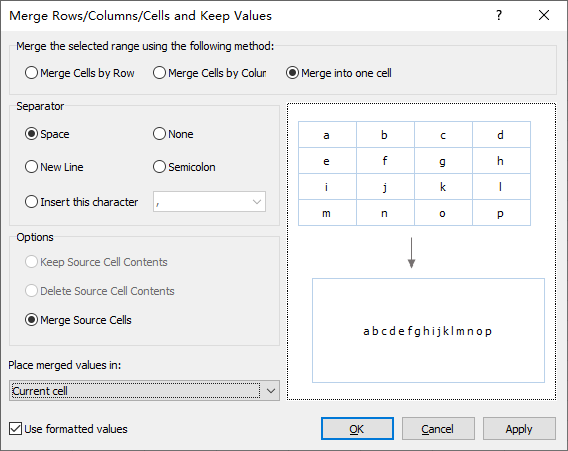
- Combine Rows, Columns or Cells without Losing Data
Enhanced for smoother operation and better usability:- Updated interface descriptions for clearer guidance.
- When merging into one cell, only the Merge Source Cells option is selected by default.
- Improved underlying logic for smoother control and more accurate results.
- Split Data
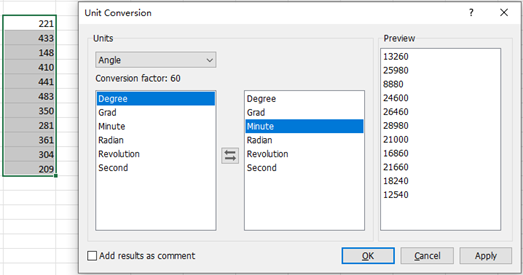
Introduced a new Worksheet Save Location option, allowing you to save split worksheets either in the current workbook or in a new workbook. - Unit Conversion
Updated with a refreshed interface and smarter functionality:- Removed outdated metric prefixes and added more commonly used units.
- Added Custom Conversion, allowing users to define their own conversion factors.
- Optimized large dataset processing for faster speed and greater stability.
- Select Interval Rows & Columns
Optimized for large datasets — now faster, smoother, and more reliable. - Insert Blank Rows & Columns
Optimized for large datasets — now faster, smoother, and more reliable. - Flip Horizontal / Flip Vertical
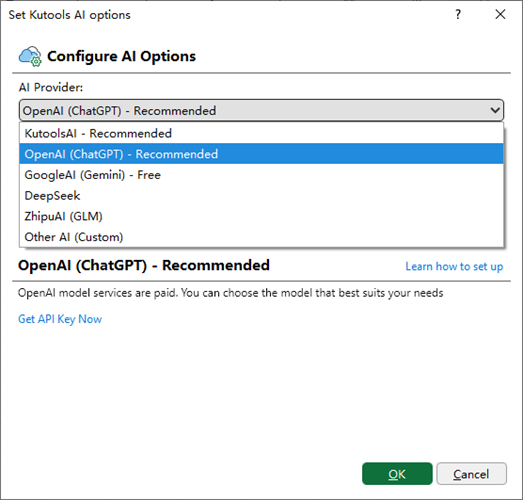
Optimized for large datasets — now faster, smoother, and more reliable. - Kutools AI Options
The Kutools AI Options window has been enhanced to:- Support more AI providers.
- Support online updates for providers and models.
- Allow users to customize AI providers as needed.

Fixed
- Date Picker: Fixed issues where the calendar didn’t refresh properly when selecting years, and date hints didn’t update in time.
- Fixed: Some minor bugs.
Best Office Productivity Tools
Supercharge Your Excel Skills with Kutools for Excel, and Experience Efficiency Like Never Before. Kutools for Excel Offers Over 300 Advanced Features to Boost Productivity and Save Time. Click Here to Get The Feature You Need The Most...
Office Tab Brings Tabbed interface to Office, and Make Your Work Much Easier
- Enable tabbed editing and reading in Word, Excel, PowerPoint, Publisher, Access, Visio and Project.
- Open and create multiple documents in new tabs of the same window, rather than in new windows.
- Increases your productivity by 50%, and reduces hundreds of mouse clicks for you every day!
All Kutools add-ins. One installer
Kutools for Office suite bundles add-ins for Excel, Word, Outlook & PowerPoint plus Office Tab Pro, which is ideal for teams working across Office apps.





- All-in-one suite — Excel, Word, Outlook & PowerPoint add-ins + Office Tab Pro
- One installer, one license — set up in minutes (MSI-ready)
- Works better together — streamlined productivity across Office apps
- 30-day full-featured trial — no registration, no credit card
- Best value — save vs buying individual add-in