Kutools for Excel 34.00 - Release notes
Release Notes – Kutools for Excel 34.00
The latest version of Kutools for Excel 34.00 is now available!
This update introduces a new feature along with several improvements and optimizations, designed to make your Excel experience smoother, more efficient, and more convenient.
Download or upgrade now to try Kutools for Excel 34.00 free!
Tip: full function & feature, free trial in 30 days! If your 2-year free upgrade support period hasn’t expired, you are entitled to a free upgrade.
New Feature
- Hover View
This new Hover View feature allows you to instantly preview the content of truncated cells simply by hovering your mouse over them. A floating preview window displays the cell’s text or formula without entering edit mode. Compared with Excel’s default hover behavior for truncated cells that display as “###”, Hover View provides a faster, clearer, and more intuitive way to inspect cell contents.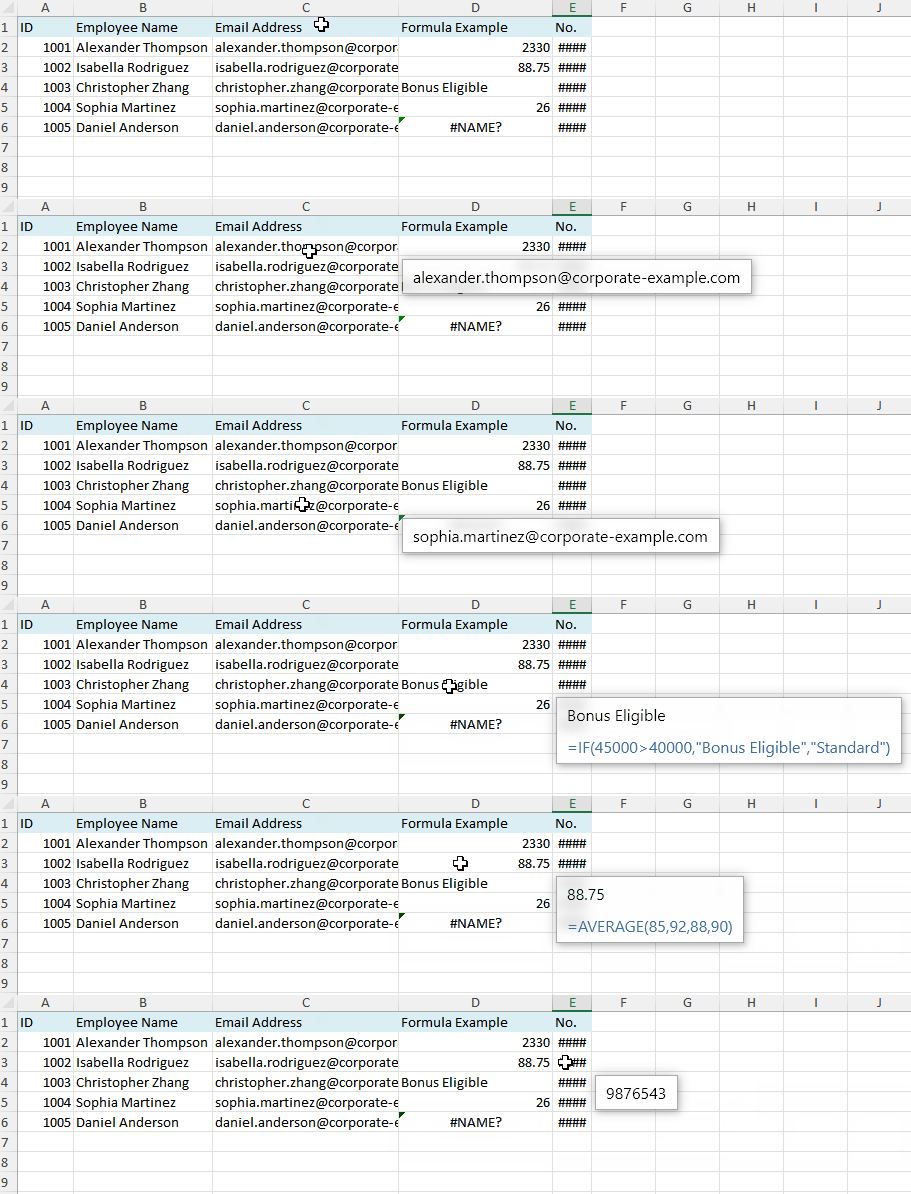
- Full content preview
Quickly view the complete content of cells whose text is truncated or displayed as “###”, ensuring you can read the entire value without resizing columns. - Formula preview support
Optionally display the formula stored in the cell directly in the preview window, allowing you to inspect formula logic without entering editing mode. - Flexible preview window settings
Customize the position of the preview window and adjust the font size for better readability and convenience.
- Full content preview
Improvements
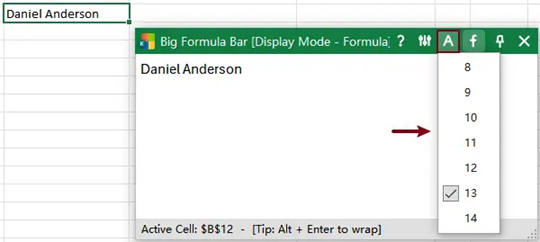
- Big Formula Bar
The Enhanced Formula Bar has been improved to provide greater flexibility and usability:- When closed, it can now minimize to a floating icon for quick access.
- The distance between the formula bar and the active cell can now be adjusted by dragging (the floating icon also supports dragging).

- Supports customizing the font size in the formula editing box for improved readability.
- Encrypt/Decrypt Workbook
Improved encryption algorithms and optimized underlying logic. - Format Converter
Improved encryption algorithms and optimized underlying logic.
Fixed
- Fixed: Some minor bugs.
Best Office Productivity Tools
Supercharge Your Excel Skills with Kutools for Excel, and Experience Efficiency Like Never Before. Kutools for Excel Offers Over 300 Advanced Features to Boost Productivity and Save Time. Click Here to Get The Feature You Need The Most...
Office Tab Brings Tabbed interface to Office, and Make Your Work Much Easier
- Enable tabbed editing and reading in Word, Excel, PowerPoint, Publisher, Access, Visio and Project.
- Open and create multiple documents in new tabs of the same window, rather than in new windows.
- Increases your productivity by 50%, and reduces hundreds of mouse clicks for you every day!
All Kutools add-ins. One installer
Kutools for Office suite bundles add-ins for Excel, Word, Outlook & PowerPoint plus Office Tab Pro, which is ideal for teams working across Office apps.





- All-in-one suite — Excel, Word, Outlook & PowerPoint add-ins + Office Tab Pro
- One installer, one license — set up in minutes (MSI-ready)
- Works better together — streamlined productivity across Office apps
- 30-day full-featured trial — no registration, no credit card
- Best value — save vs buying individual add-in