Kutools for Excel 36.00 - Release notes
Release Notes – Kutools for Excel 36.00
We are pleased to announce the release of Kutools for Excel 36.00, introducing powerful new tools for data standardization, formatting, data analysis, and formula building. This version also enhances email compatibility, improves filtering performance, and includes various UI refinements and stability improvements.
Download or upgrade now to try Kutools for Excel 36.00 free!
Tip: full function & feature, free trial in 30 days! If your 2-year free upgrade support period hasn’t expired, you are entitled to a free upgrade.
New Features
- Convert State Names and Abbreviations
The Convert State Names and Abbreviations feature helps quickly standardize U.S. states and Canadian provinces by converting between their full names and official abbreviations.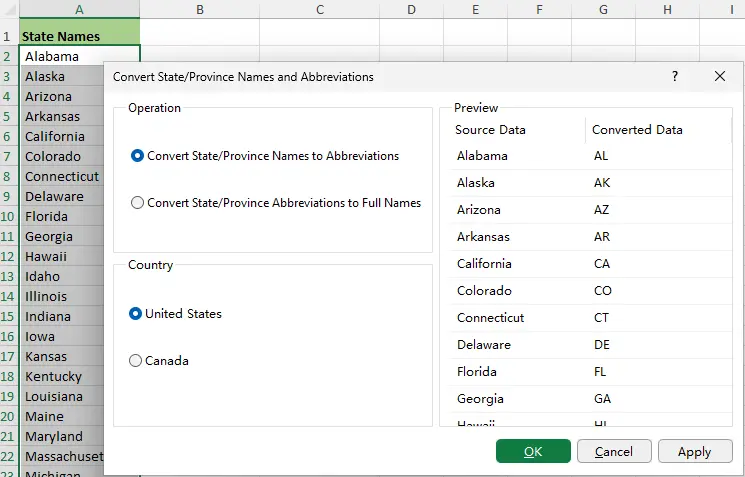
- Convert Country/Region Name and ISO Codes
The Convert Country/Region Names and ISO Codes feature helps convert country and region names to internationally recognized ISO codes, or convert ISO codes back to country and region names, making international data standardization faster and more consistent.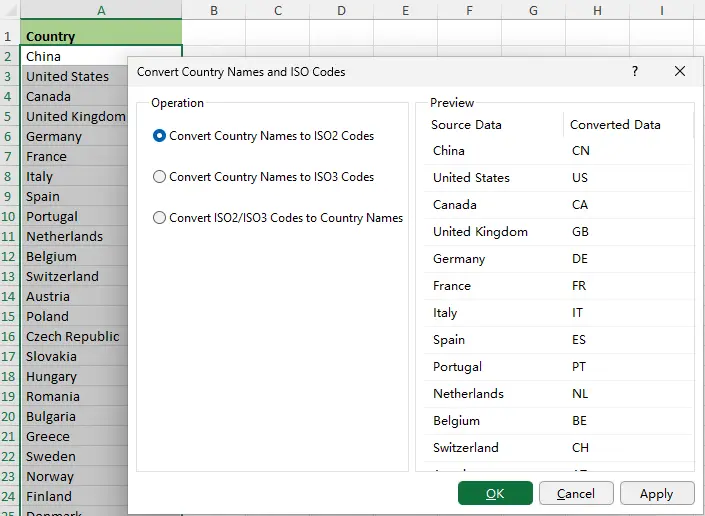
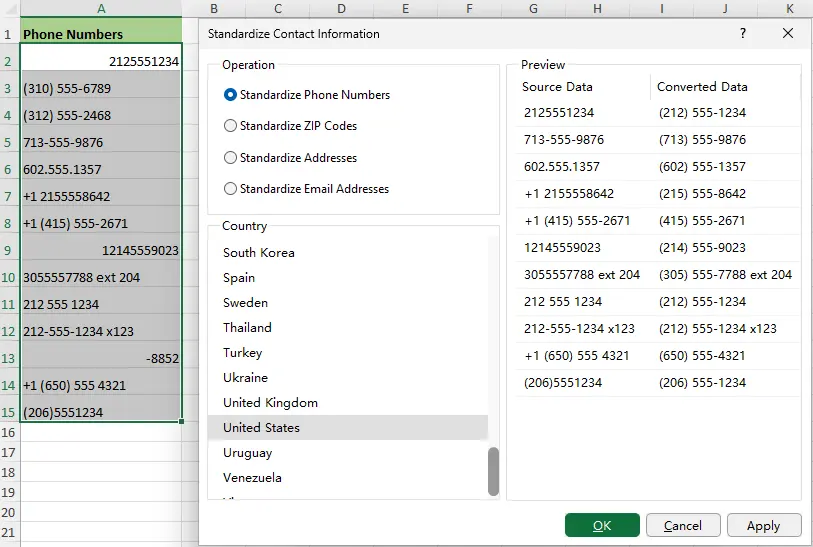
- Standardize Contact Information
The Standardize Contact Information feature helps standardize common types of contact information across multiple countries and regions, improving data consistency and readability for international datasets.- Phone Numbers
- Postal / ZIP Codes
- Addresses
- Email Addresses
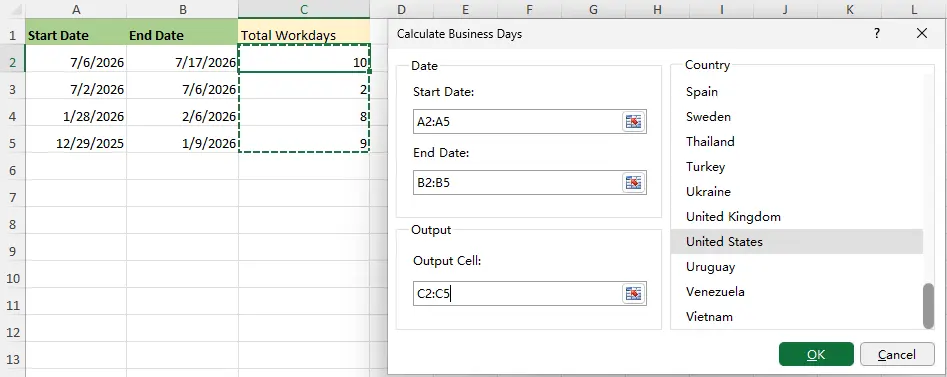
- Workday Calculator
The Workday Calculator feature calculates the number of business days between two dates by excluding weekends and country-specific public holidays.- Supports multiple countries and built-in holiday calendars.
- Calculates business days for single dates or batch ranges.
- Automatically excludes weekends and country-specific public holidays.
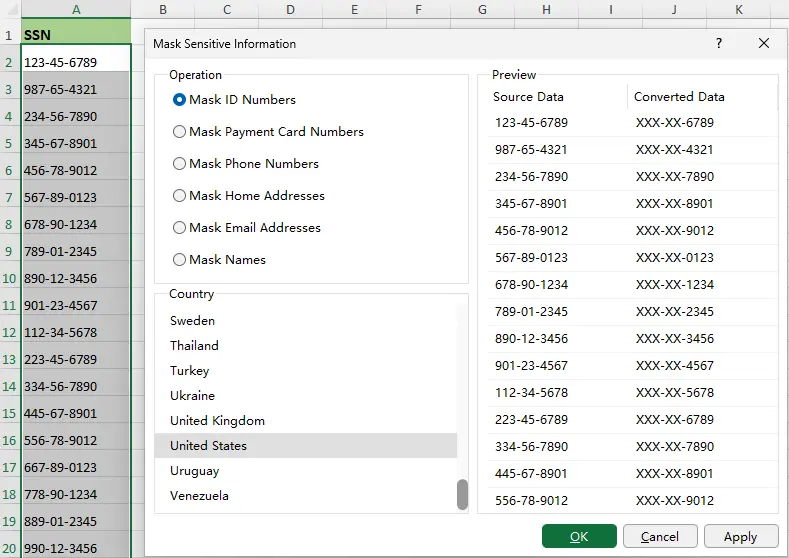
- Mask Sensitive Information
The Mask Sensitive Information feature helps protect confidential data by masking sensitive information while preserving enough detail for easy recognition. It supports country-specific data formats across multiple countries and regions.- ID Numbers
- Payment Card Numbers
- Phone Numbers
- Home Addresses
- Email Addresses
- Personal Names
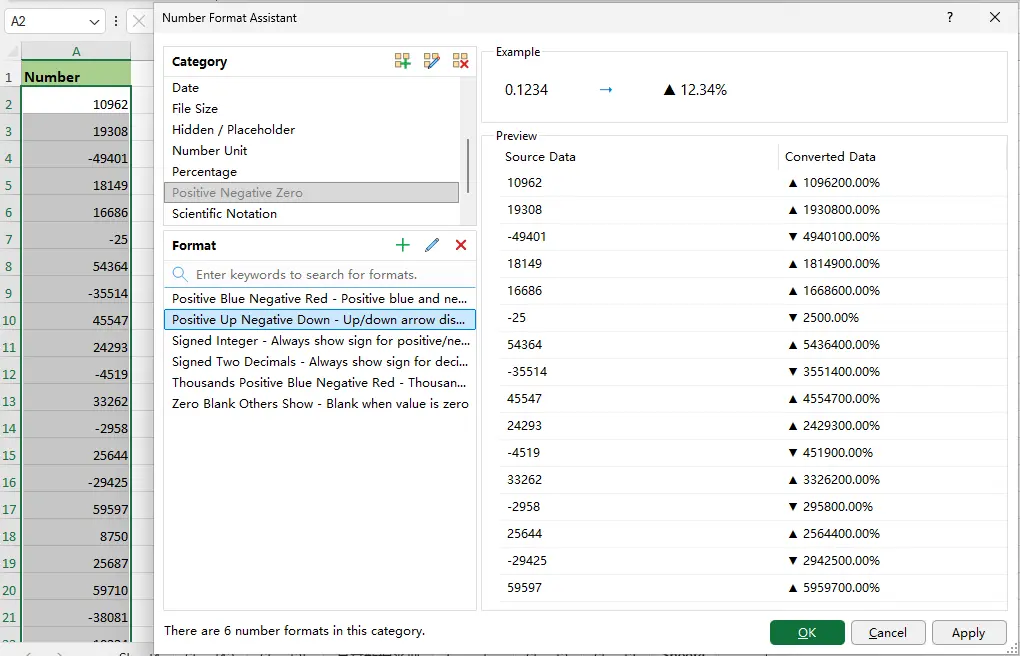
- Number Format Helper
The Number Format Helper feature makes it easy to apply professional number formats without memorizing or writing complex custom format codes. It provides a rich library of 99 predefined number formats organized into 14 categories, along with live preview and custom format management.- 99 predefined number formats organized into 14 categories for quick browsing.
- Covers common scenarios including currency, percentages, dates, and more.
- Instantly search and preview formats before applying them.
- Create, organize, and manage your own custom format categories and formats.
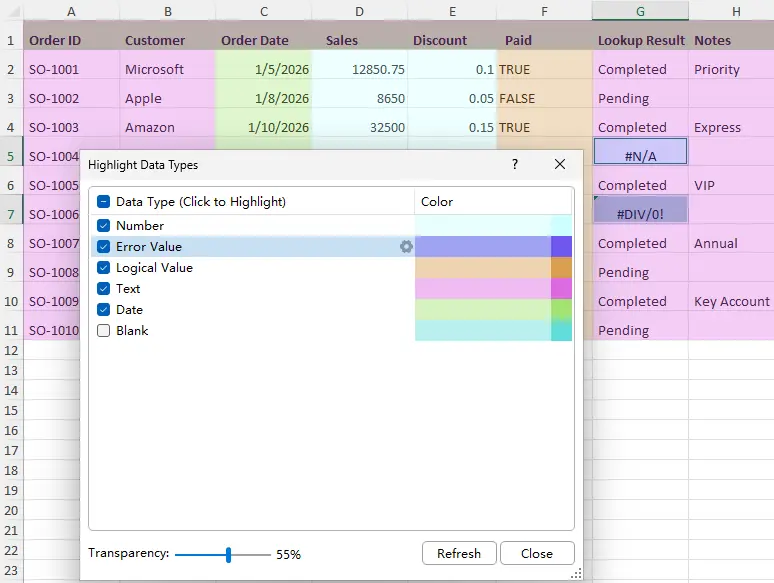
- Highlight Data Types
The Highlight Data Types feature helps quickly identify different data types in the current view of a worksheet by highlighting them with customizable colors, making data inspection and cleanup easier.- Numbers
- Text
- Dates
- Logical values (TRUE/FALSE)
- Blank cells
- Error values
- Automatically detects data types in the current worksheet view.
- Customize highlight colors for each data type.
- Click a data type to instantly select all matching visible cells.
- Easily apply formatting or perform other bulk operations on the selected cells.
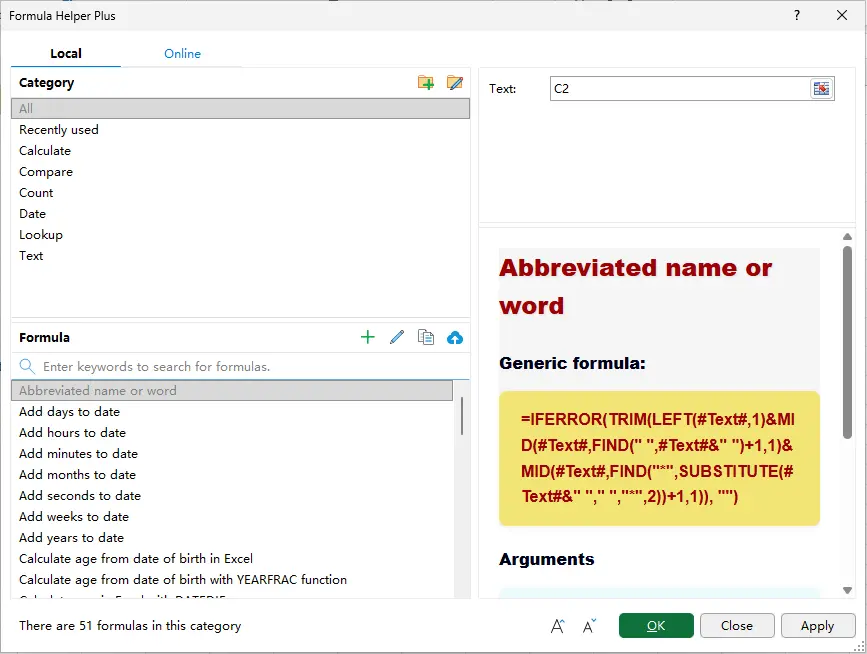
- Formula Helper Plus
Built upon the original Formula Helper, the Formula Helper Plus provides a more powerful and flexible formula-building experience. It combines Local and Online formula libraries, allowing you to quickly find formulas, understand their usage through detailed explanations and examples, and generate formulas by simply filling in the required arguments.- Upgraded from the original Formula Helper with a larger collection of more powerful and practical formulas.
- No need to memorize complex formulas or syntax—simply select the required arguments to automatically generate the formula and result.
- Browse formulas by category or quickly search by keyword.
- Displays formula syntax, parameter descriptions, and practical examples.
- Supports custom formula categories and lets you save your own formulas for future reuse.
Improvements
- Send Emails
The Send Emails feature now supports Microsoft account authentication, making it easier to send emails through Microsoft 365, Outlook.com, and other Microsoft mailboxes without manual SMTP configuration.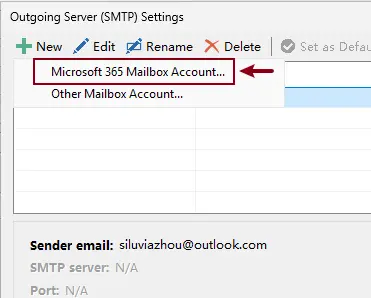
- Super Filter
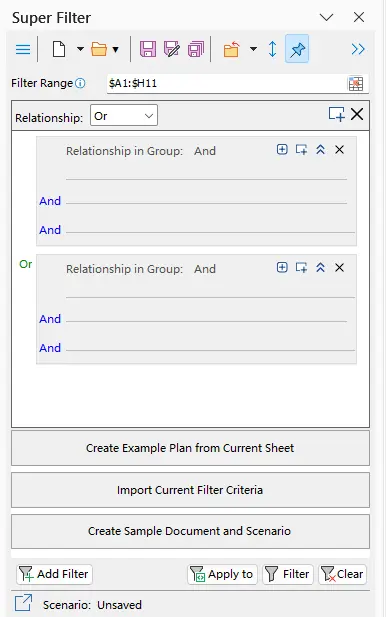
The Super Filter has been enhanced with three new options to simplify creating, importing, and managing filter criteria.- Create Example Plan from Current Sheet – Automatically generate an example filtering plan based on the current worksheet data.
- Import Current Filter Criteria – Import the filter criteria currently applied by Excel's built-in Filter feature into Super Filter.
- Create Sample Document and Scenario – Create a sample worksheet with predefined filter scenarios for quick learning and testing.
- User Interface
Improved various dialog messages and UI details for a clearer and more consistent user experience.
Fixed
- Fixed various minor bugs.
Best Office Productivity Tools
Supercharge Your Excel Skills with Kutools for Excel, and Experience Efficiency Like Never Before. Kutools for Excel Offers Over 300 Advanced Features to Boost Productivity and Save Time. Click Here to Get The Feature You Need The Most...
Office Tab Brings Tabbed interface to Office, and Make Your Work Much Easier
- Enable tabbed editing and reading in Word, Excel, PowerPoint, Publisher, Access, Visio and Project.
- Open and create multiple documents in new tabs of the same window, rather than in new windows.
- Increases your productivity by 50%, and reduces hundreds of mouse clicks for you every day!
All Kutools add-ins. One installer
Kutools for Office suite bundles add-ins for Excel, Word, Outlook & PowerPoint plus Office Tab Pro, which is ideal for teams working across Office apps.





- All-in-one suite — Excel, Word, Outlook & PowerPoint add-ins + Office Tab Pro
- One installer, one license — set up in minutes (MSI-ready)
- Works better together — streamlined productivity across Office apps
- 30-day full-featured trial — no registration, no credit card
- Best value — save vs buying individual add-in