Office Tab 19.00 - Release notes
Office Tab 19.00 – Release Notes
Office Tab 19.00 introduces flexible tab grouping and window management features for Word, Excel, and PowerPoint. This release also improves the appearance of the modern tab bar and resolves several stability and display issues. Click here to upgrade or start a free trial of this version!
✨ New Features
1. Drag and Drop Tabs Across Multiple Windows
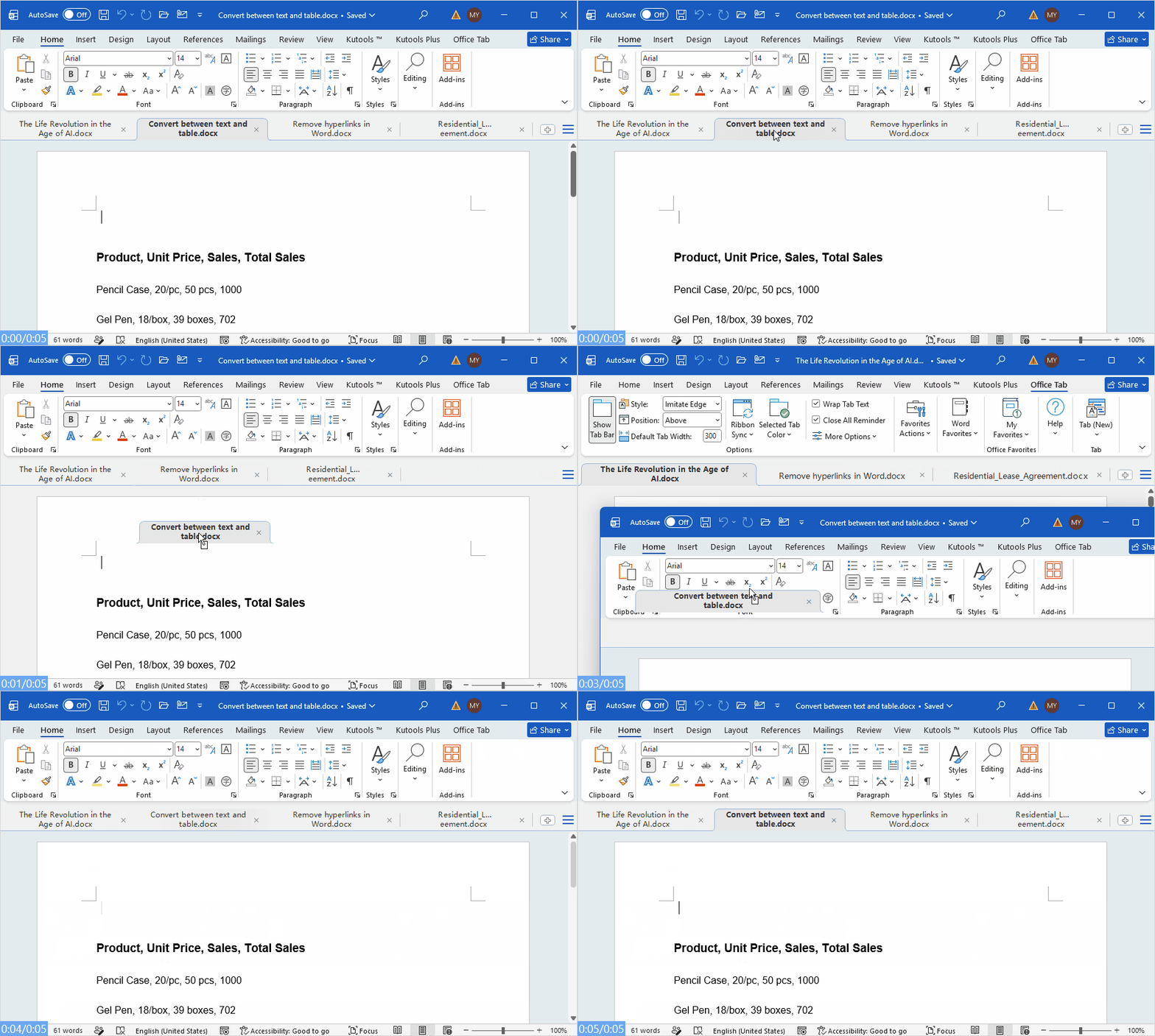
Easily organize your workspace by dragging tabs between different windows, moving them into an existing tab bar, or separating them into a new window for a more flexible and efficient document layout.
You can now:
- Drag a tab out of the current tab bar to open it in a separate window.
- Drag a tab from a separate window into an existing tab bar to merge it with that window.
- Drag and move tabs freely between different tab bars.
Notes:
- The drag-and-drop feature for moving tabs to a new window is available only in the modern tab bar and is not supported in the classic tab bar.
- This feature is available only in the Word, Excel, and PowerPoint components of Office Tab and Office Tab Pro.
2. New Window Commands for PowerPoint
Two new commands have been added to the tab bar context menu in the PowerPoint modern tab interface:
- New in New Window: Creates a new blank presentation and opens it in a separate PowerPoint window.
- Move to New Window: Moves the current presentation tab from its existing tab bar to a separate PowerPoint window.
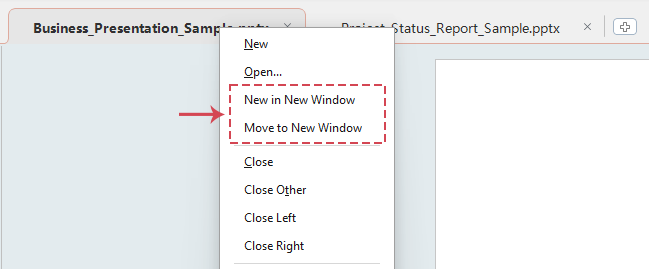
These commands provide more convenient ways to create and organize PowerPoint presentations across multiple windows.
🔧 Improvements
1. Updated Context Menu Command Name
In the modern tab bar context menu for the Word and Excel components of the Classic and Plus editions, the following command has been renamed:
Open in New Window has been changed to Move to New Window.
2. Improved Interface and Menu Design
The appearance of several tab bar elements and context menus has been refined for a cleaner, more consistent, and user-friendly experience.
🐞 Bug Fixes
- Fixed an issue where the confirmation dialog displayed when closing multiple windows could appear incomplete if the main Office window was not maximized.
- Fixed an issue where notification messages could repeatedly appear under rare circumstances.
- Fixed an issue where an error message could appear when starting newer versions of Word 365 with the Automatically Create New Files in the Cloud setting enabled.
- Fixed several other minor issues.
Best Office Productivity Tools
Supercharge Your Excel Skills with Kutools for Excel, and Experience Efficiency Like Never Before. Kutools for Excel Offers Over 300 Advanced Features to Boost Productivity and Save Time. Click Here to Get The Feature You Need The Most...
Office Tab Brings Tabbed interface to Office, and Make Your Work Much Easier
- Enable tabbed editing and reading in Word, Excel, PowerPoint, Publisher, Access, Visio and Project.
- Open and create multiple documents in new tabs of the same window, rather than in new windows.
- Increases your productivity by 50%, and reduces hundreds of mouse clicks for you every day!
All Kutools add-ins. One installer
Kutools for Office suite bundles add-ins for Excel, Word, Outlook & PowerPoint plus Office Tab Pro, which is ideal for teams working across Office apps.





- All-in-one suite — Excel, Word, Outlook & PowerPoint add-ins + Office Tab Pro
- One installer, one license — set up in minutes (MSI-ready)
- Works better together — streamlined productivity across Office apps
- 30-day full-featured trial — no registration, no credit card
- Best value — save vs buying individual add-in