Remove extra space after paragraphs in Word using Kutools AI
Extra spacing after paragraphs is one of the most common formatting issues users face in Word. These unwanted spaces often appear after pasted content, document merges, or inconsistent manual formatting. They can make your document look uneven, increase page count, and disrupt professional layout.
Kutools for Word simplifies this task with its AI-powered Chat feature. Instead of manually adjusting paragraph settings or hunting for inconsistent spacing, you can simply describe what you want fixed. Kutools AI interprets your request, identifies the correct formatting tools, and applies precise adjustments - all while protecting surrounding formatting. The tutorial below shows you how to quickly remove extra spacing after paragraphs using Kutools AI.
Step-by-step guide to remove extra space after paragraphs using Kutools for Word
- Open your document, then go to the Kutools tab and choose AI > AI Utilities. This opens the Kutools AI Utilities pane on the right side of your screen.
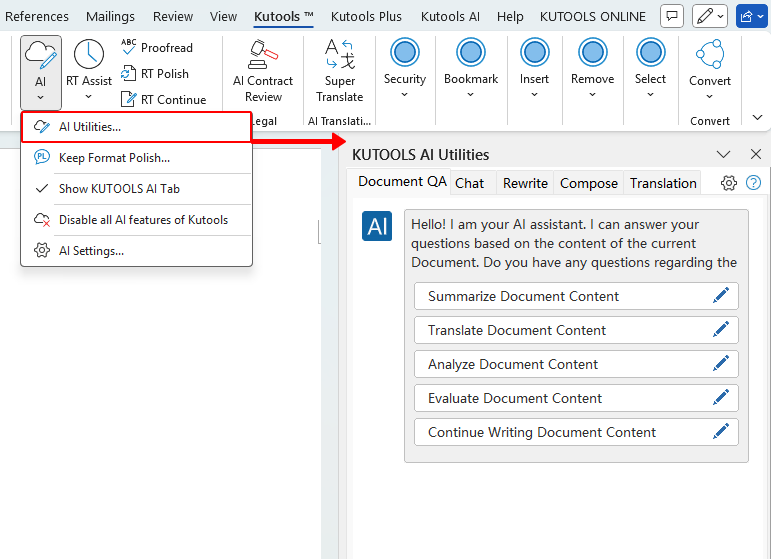
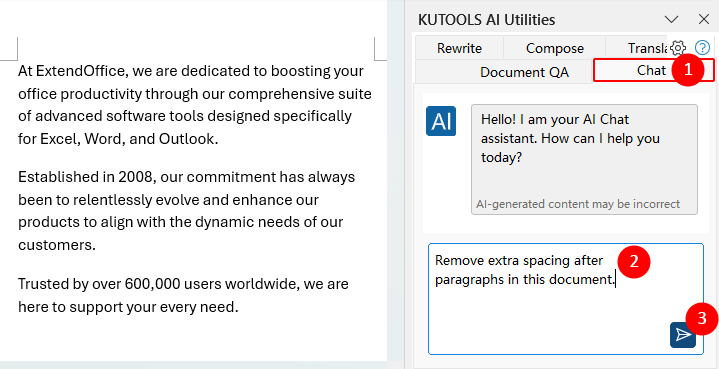
- Select the Chat tab and describe what you want the AI to correct. Examples of helpful instructions include:
- “Remove extra spacing after paragraphs in this document.”
- “Remove extra spacing after the paragraphs in the current selection.” (Make sure the paragraphs you want to update are selected before submitting your request.)
 (or press Enter).
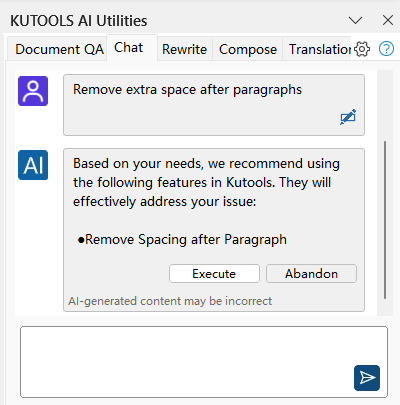
- Kutools AI reviews your message and suggests the appropriate formatting tool, e.g., Remove Spacing after Paragraph, and shows buttons such as Execute and Abandon.
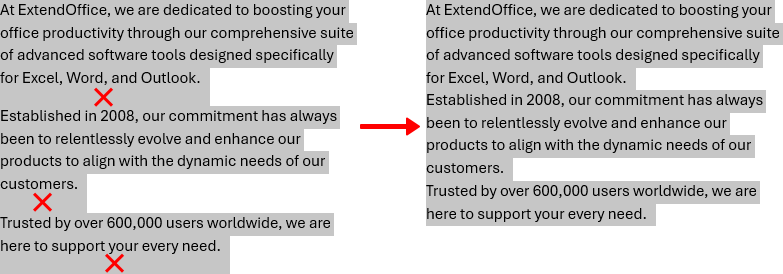
- Click Execute to let Kutools apply the recommended correction. The spacing after the affected paragraphs will be cleared instantly.
 (or press
Note: Make sure Kutools AI is activated with a valid AI provider (such as OpenAI or Google AI) and that you are using a Kutools for Word version that includes the AI Utilities pane.
Best Office Productivity Tools
Kutools for Word - Elevate Your Word Experience
🤖 Kutools AI Features: AI Assistant / Real-Time Assistant / Super Polish (Preserve Format) / Super Translate (Preserve Format) / AI Redaction / AI Proofread...
📘 Document Mastery: Split Pages / Merge Documents / Export Selection in Various Formats (PDF/TXT/DOC/HTML...) / Batch Convert to PDF...
✏ Contents Editing: Batch Find and Replace across Multiple Files / Resize All Pictures / Transpose Table Rows and Columns / Convert Table to Text...
🧹 Effortless Clean: Sweap away Extra Spaces / Section Breaks / Text Boxes / Hyperlinks / For more removing tools, head to the Remove group...
➕ Creative Inserts: Insert Thousand Separators / Check Boxes / Radio Buttons / QR Code / Barcode / Multiple Pictures / Discover more in the Insert group...
🔍 Precision Selections: Pinpoint Specific Pages / Tables / Shapes / Heading Paragraphs / Enhance navigation with more Select features...
⭐ Star Enhancements: Navigate to Any Location / Auto-Insert Repetitive Text / Toggle Between Document Windows / 11 Conversion Tools...
🌍 Supports 40+ Languages: Use Kutools in your preferred language – supports English, Spanish, German, French, Chinese, and 40+ others!

Office Tab - Tabs for Office, Power for You
- Enable tabbed editing and reading in Word, Excel, PowerPoint, Publisher, Access, Visio and Project.
- Open and create multiple documents in new tabs of the same window, rather than in new windows.
- Increases your productivity by 50%, and reduces hundreds of mouse clicks for you every day!

✨ Kutools for Office – One Installation, Five Powerful Tools!
Includes Office Tab Pro · Kutools for Excel · Kutools for Outlook · Kutools for Word · Kutools for PowerPoint
📦 Get all 5 tools in one suite | 🔗 Seamless integration with Microsoft Office | ⚡ Save time and boost productivity instantly
Best Office Productivity Tools
Kutools for Word - 100+ Tools for Word
- 🤖 Kutools AI Features: AI Assistant / Real-Time Assistant / Super Polish / Super Translate / AI Redaction / AI Proofread
- 📘 Document Mastery: Split Pages / Merge Documents / Batch Convert to PDF
- ✏ Contents Editing: Batch Find and Replace / Resize All Pictures
- 🧹 Effortless Clean: Remove Extra Spaces / Remove Section Breaks
- ➕ Creative Inserts: Insert Thousand Separators / Insert Check Boxes / Create QR Codes
- 🌍 Supports 40+ Languages: Kutools speaks your language – 40+ languages supported!
Table of Contents
Kutools for Word
Brings 100+ advanced features to Word
- 🧩 Overview
- 📥 Free Download
- 🛒 Purchase Now
- 🎁 60-Day Free Trial available