Kutools for Word 19.00 – Release notes
Kutools for Word 19.00 – Release notes
We are excited to announce the release of Kutools for Word 19.00, packed with brand-new features and important improvements to enhance your productivity and editing experience.
New features
Convert Word document to PDF file
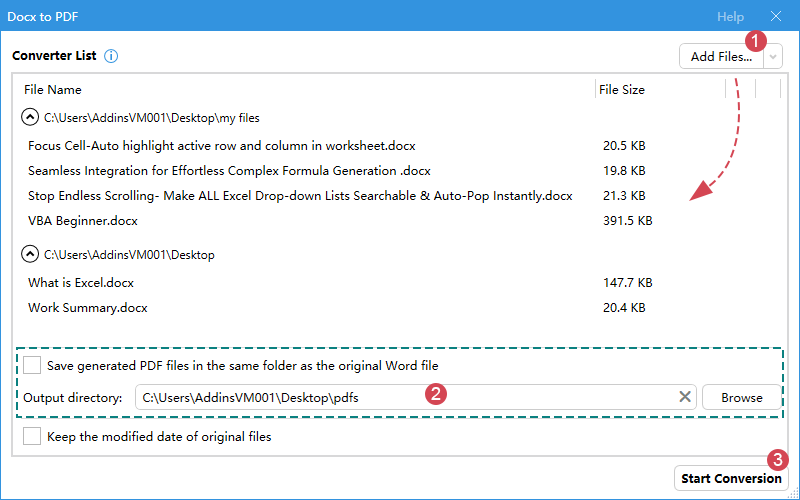
- Convert Current Document to PDF: Effortlessly export your current Word document to a high-fidelity PDF while preserving formatting, styles, and layout.
- Convert multiple Word documents to PDF files: Batch-transform many Word files—or an entire folder—into high-quality PDFs in just a few clicks.
Convert PDF file to Word document
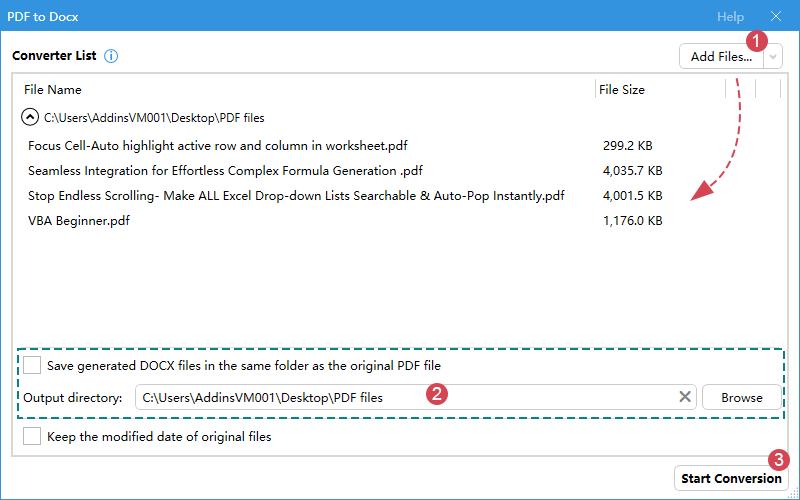
- Convert Single PDF File to Word: Turn any PDF into a fully editable Word file with accurate text, images, and tables.
- Convert Multiple PDF Files to Word: Batch-convert multiple PDFs into editable Word documents to save time and effort.
Insert Symbols / emojis
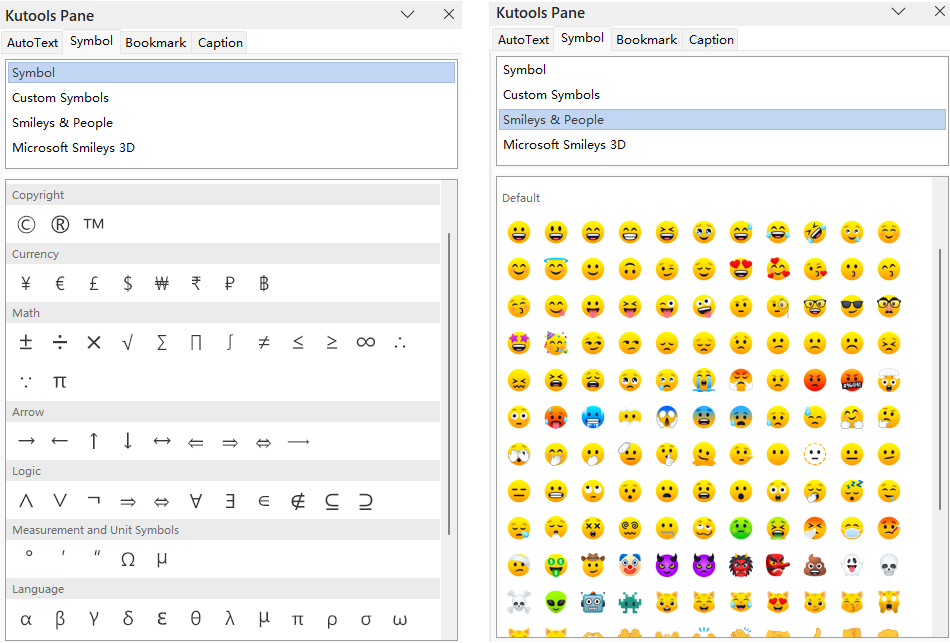
Quickly add math symbols, arrows, currency, and modern emoji with an intuitive picker—no more digging through complex menus.
- Tip: Create and save custom symbols in the pane for quick, frequent use.
Compact View
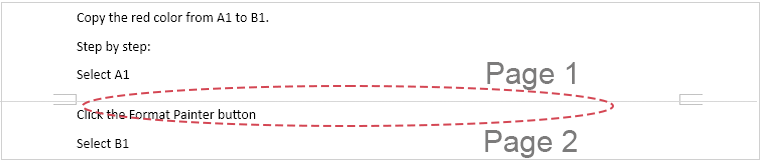
Instantly hide the white space between pages by collapsing headers and footers for a cleaner, more continuous reading and editing experience—especially helpful on smaller screens or when reviewing long documents.
Optimizations & Enhancements
Redesigned Ribbon or Feature Icons
Enjoy a modern, sharper, and more intuitive icon set that improves tool recognition and blends seamlessly with Microsoft Word.
Optimized Startup Speed
Kutools for Word now loads faster than ever for a smoother start.
Improved Stability and Crash Fixes
We addressed multiple issues that could lead to crashes, delivering a significantly more stable experience.
Other minor bug fixes
Additional refinements for overall reliability and polish.
Best Office Productivity Tools
Kutools for Word - Elevate Your Word Experience with Over 100 Remarkable Features!
🤖 Kutools AI Features: AI Assistant / Real-Time Assistant / Super Polish (Preserve Format) / Super Translate (Preserve Format) / AI Redaction / AI Proofread...
📘 Document Mastery: Split Pages / Merge Documents / Export Selection in Various Formats (PDF/TXT/DOC/HTML...) / Batch Convert to PDF...
✏ Contents Editing: Batch Find and Replace across Multiple Files / Resize All Pictures / Transpose Table Rows and Columns / Convert Table to Text...
🧹 Effortless Clean: Sweap away Extra Spaces / Section Breaks / Text Boxes / Hyperlinks / For more removing tools, head to the Remove group...
➕ Creative Inserts: Insert Thousand Separators / Check Boxes / Radio Buttons / QR Code / Barcode / Multiple Pictures / Discover more in the Insert group...
🔍 Precision Selections: Pinpoint Specific Pages / Tables / Shapes / Heading Paragraphs / Enhance navigation with more Select features...
⭐ Star Enhancements: Navigate to Any Location / Auto-Insert Repetitive Text / Toggle Between Document Windows / 11 Conversion Tools...
🌍 Supports 40+ Languages: Use Kutools in your preferred language – supports English, Spanish, German, French, Chinese, and 40+ others!

Office Tab - Brings Tabbed interface to Office, Make Your Work Much Easier
- Enable tabbed editing and reading in Word, Excel, PowerPoint, Publisher, Access, Visio and Project.
- Open and create multiple documents in new tabs of the same window, rather than in new windows.
- Increases your productivity by 50%, and reduces hundreds of mouse clicks for you every day!
✨ Kutools for Office – One Installation, Five Powerful Tools!
Includes Office Tab Pro · Kutools for Excel · Kutools for Outlook · Kutools for Word · Kutools for PowerPoint
📦 Get all 5 tools in one suite | 🔗 Seamless integration with Microsoft Office | ⚡ Save time and boost productivity instantly
Best Office Productivity Tools
Kutools for Word - 100+ Tools for Word
- 🤖 Kutools AI Features: AI Assistant / Real-Time Assistant / Super Polish / Super Translate / AI Redaction / AI Proofread
- 📘 Document Mastery: Split Pages / Merge Documents / Batch Convert to PDF
- ✏ Contents Editing: Batch Find and Replace / Resize All Pictures
- 🧹 Effortless Clean: Remove Extra Spaces / Remove Section Breaks
- ➕ Creative Inserts: Insert Thousand Separators / Insert Check Boxes / Create QR Codes
- 🌍 Supports 40+ Languages: Kutools speaks your language – 40+ languages supported!